Category: ChatGPT

  • How to Create Studio Ghibli-Style Images Using ChatGPT

    How to Create Studio Ghibli-Style Images Using ChatGPT

    Recently, ChatGPT’s new image generation feature (GPT-4o) has gone viral, especially for transforming images into the iconic Studio Ghibli style. Social media platforms like X and Instagram are filled with users sharing their whimsical creations inspired by the famous Japanese animation studio.

    What is GPT-4o and why is it special?

    GPT-4o is a new model from OpenAI that combines text and image creation in one easy-to-use tool. It’s gaining attention for its:

    • High-quality images similar to those created by advanced tools like Midjourney V6.
    • Precise editing of images using simple, natural-language instructions.
    • Customization options including different sizes, colors, and transparent backgrounds.

    The best part? It’s already available for Plus, Pro, Team, and rolling out to Free users soon.

    Why Studio Ghibli Style?

    Studio Ghibli is loved worldwide for its beautifully hand-drawn animations and dreamy storytelling. GPT-4o’s creations stand out because they’re remarkably close to Ghibli’s unique look, making it the favorite among other AI tools for creating authentic Ghibli-style images.

    Step-by-Step Guide: Creating Studio Ghibli-Style images

    Prerequisites

    1. Make sure you have access to GPT-4o through your ChatGPT account
    2. Update your ChatGPT app or simply visit chatgpt.com

    Steps

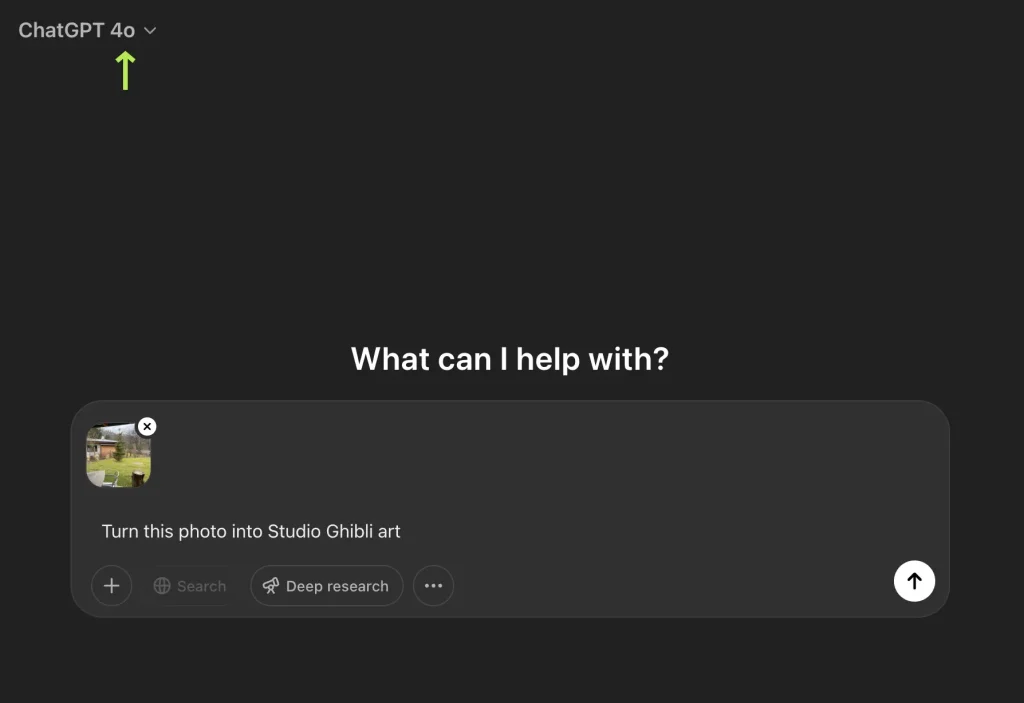
    1. Open ChatGPT: Select GPT-4o from the dropdown menu.
    2. Upload your image: Click the image icon or ‘+’ button and choose your photo.
    3. Enter a simple prompt:
      • “Turn this photo into Studio Ghibli art.”
      • “Show me as a Studio Ghibli character.”
      • “Make this landscape whimsical, Ghibli style.”
      • “Turn this picture into a Studio Ghibli animated style, maintaining 100% of the original image’s composition, details, and subjects.”
    4. Wait a moment: Give it about a minute. Great things take time!

    Tips for better results

    • Be clear and specific in your prompts, e.g., “soft lighting and pastel colors.”
    • Try out different image types – selfies, landscapes, pets, or even movie scenes.
    • Keep prompts straightforward to avoid errors.
    • Always keep requests safe and respectful to avoid violating OpenAI’s guidelines. Avoid prompts involving inappropriate or violent content.

  • The Future of Work: How AI Like ChatGPT Will Impact Jobs

    The Future of Work: How AI Like ChatGPT Will Impact Jobs

    I. Introduction

    The meteoric rise of AI chatbots like ChatGPT is showcasing just how advanced artificial intelligence is becoming. These systems can now generate remarkably human-like content, converse intelligently, and automate a growing array of tasks.

    As AI capabilities expand, many are wondering – how will this impact the future of work? Which roles and industries stand to be most disrupted? Do we risk widespread technological unemployment?

    The full extent of AI’s impact on jobs remains unclear. But by examining the unique capabilities of both humans and machines, we can predict some shifts that lie ahead. With proactive planning, companies and workers can adapt to shape an augmented yet human-centered future of work.

    II. How AI Will Replace Some Jobs

    It’s evident that AI will displace many jobs focused on predictable, rules-based tasks. These include roles like telemarketers, data entry clerks, tax preparers, bank tellers, and cashiers. AI chatbots already handle a growing portion of routine customer service interactions. Robots are taking over structured warehouse and factory work. And algorithms are analyzing documents and data faster than any human.

    As the capability of AI systems improves, they will continue to subsume jobs with these characteristics:

    • Highly repetitive and predictable tasks
    • Work based on rigid rules rather than discretion
    • Large volumes of straightforward data processing
    • Requires little customized communication

    Workers in these roles will need to consider reskilling and transitioning into less automatable occupations. For companies, integrating AI for these use cases can boost efficiency and lower labor costs. But they will need to weigh business benefits against workforce impacts.

    III. How AI Will Augment Other Jobs

    Fortunately, many roles require uniquely human strengths like complex communication, creativity, strategy, leadership and empathy. AI will struggle to fully replicate these soft skills for the foreseeable future.

    In these jobs, AI will become more of a powerful assistant than a replacement. Rather than taking away work, it will augment people’s productivity. Professionals like marketers, designers, analysts, recruiters, scientists, and managers will increasingly use AI tools to assist with key tasks.

    For example, a graphic designer could use AI to automatically generate and refine images, then focus their time on the highest-value creative work. Lawyers might use AI search tools to quickly find precedents rather than manually reviewing documents. Care workers can delegate charting and reporting to chatbots, freeing up time for patient interaction.

    But to realize these gains, workers will need to proactively integrate AI into their workflows. Those who master complementing AI’s strengths with their own human abilities will thrive. Others risk obsolescence. Upskilling initiatives focused on workflow integration will be crucial.

    IV. New Roles AI Will Create

    While displacing some roles, AI will also lead to entirely new types of work and specializations.

    As companies adopt complex AI systems, they will need a range of new roles like:

    • AI trainers – to judiciously train AI models
    • AI interaction designers – to make systems easy and safe to use
    • Algorithm auditors – to assess systems for technical flaws and bias
    • AI operations engineers – to manage large-scale AI infrastructures
    • AI trust assessors – to evaluate when and how much to rely on AI

    There will also be new hybrid roles combining AI expertise with human skills. Imagine an AI-powered recruiter that can instantly screen resumes, but a human makes final evaluations and sealing the deal. Or AI and human creative duos designing innovations together.

    Companies will need to horizon scan for these emerging roles and either reskill internally or acquire new AI-savvy talent.

    V. Impact on Companies

    Integrating more AI capabilities will require changes across organizations – their structures, workforce models and job roles.

    This includes:

    • New training programs to upskill staff in using AI tools in existing roles
    • Developing roles and teams focused exclusively on deploying and managing AI systems
    • Redesigning processes and workflows to seamlessly integrate AI capabilities
    • Assessing workflows to determine the appropriate split between AI automation and human work
    • Responsible workforce planning focused on augmentation over automation where possible
    • Fostering organizational cultures that value human skills alongside AI adoption

    Navigating these changes will not be straightforward. But companies that proactively redesign work and training around AI stand to gain substantial productivity benefits and a competitive edge.

    VI. Impact on Skills

    As AI enters workplaces, the mix of human skills in demand will continue evolving. Based on analysis from the World Economic Forum and others, some skills poised for growing importance include:

    • Critical thinking – to evaluate AI’s limitations and exercise human judgement
    • Creativity – to complement AI output with an intuitive human touch
    • Scientific skills – to effectively use and improve intelligent systems
    • Technology design – to develop solutions combining AI and human capabilities
    • Management skills – to reorganize workflows and teams around AI capabilities
    • Emotional intelligence – to provide compassion and build trust

    Of course, foundational technical skills to actually build, implement and work with AI tools will also be crucial. Programming, data science, and UI/UX design for AI systems are already in shortage.

    Continuous learning across industries will be essential to keep pace. Companies will need to provide ample training opportunities. Individuals should proactively build skills in using and complementing AI systems.

    VII. The Outlook for Employment

    While AI will substantially change work processes and skill requirements across many industries, humans are adaptable. With measured adoption and responsible policies, we can avoid some of the bleakest projections on job losses.

    A recent McKinsey analysis suggests that with sufficient transition support and retraining, only around 15% of global work hours stand to be automated by 2030. New human roles working with AI may offset losses. But smooth workforce transitions are far from guaranteed.

    The extent of displacement will depend on how proactively societies upskill workers and shape AI systems to augment rather than replace people where appropriate. Individuals, companies, and governments all have roles to play in this responsible transition.

    VIII. Prepare for the AI-Driven Future

    As AI capabilities grow, virtually every industry will continue transforming. While the outlook is positive for those who proactively adapt, complacency risks being left behind.

    Here are some tips to future-proof your skillset and career in the AI era:

    • Learn in-demand skills like data science, machine learning engineering, UI/UX design, and AI ethics and governance. Many programs and online courses are available on websites like Coursera, Udemy, or Khan Academy.
    • Get hands-on experience building AI prototypes, tools, and apps through side projects or hackathons.
    • Understand how AI can augment your current role by taking inventory of repetitive tasks ripe for automation.
    • Experiment with the latest AI applications like ChatGPT, Bard or Claude to appreciate their capabilities and limitations.
    • Stay on top of developments through newsletters, publications, events and communities.
    • Develop soft skills like creativity, collaboration, emotional intelligence, and critical thinking.
    • Maintain a mindset of lifelong learning as technology progresses and new techniques emerge.

    Whether you aim to directly specialize in AI or simply integrate it into your work, dedicating time to build relevant skills will set you up for success. With human guidance, AI can supercharge human capabilities rather than replace them.

    IX. Conclusion

    Rather than either euphoria or panic, pragmatic optimism may be the right mindset when looking at AI’s impact on work. AI will not eliminate the need for human endeavor, though it will substantially change it. Through wise adoption and human-centric policies, we can ensure AI makes work more meaningful by leaving room for our irreplaceable human strengths.

    The future of work remains undetermined. With ethical AI development and proactive workforce adaptation, we maintain some agency over the shape it takes. But making the most of the AI era requires starting this transition now.

  • How to Generate New Business Ideas Using ChatGPT (Full Guide)

    How to Generate New Business Ideas Using ChatGPT (Full Guide)

    I. Introduction

    Remember when coming up with business ideas meant endless coffee-fueled brainstorming sessions? Well, since November 2022, ChatGPT has changed the game. This AI assistant has become a go-to tool for entrepreneurs looking to spark fresh business concepts – and for good reason.

    You might be wondering what makes ChatGPT special for business ideation. Here’s the thing: it’s like having a conversation with someone who’s read every business book, article, and case study out there. Pretty neat, right? When you chat with it, you’ll find yourself making connections you might never have considered on your own.

    But let’s be real for a minute. ChatGPT is not some magical business oracle and has its limitations. It won’t tell you if your idea will succeed or fail. Think of it more as a really knowledgeable friend who can help you explore possibilities. It’s great at suggesting options, but you’ll need to bring your own experience and judgment to the table.

    You know what makes the biggest difference? How you work with it. Getting solid business ideas from ChatGPT is a bit like being a good interviewer – you need to ask the right questions and guide the conversation. Sometimes the best insights come from asking something in a slightly different way or building on an unexpected response.

    In this guide, we’ll walk through exactly how to get the most out of ChatGPT for business ideation. Whether you’re starting your first venture or adding to your business portfolio, you’ll learn practical ways to use this tool to generate and refine your ideas.

    Read also: Mastering ChatGPT: How to Craft Effective Prompts (Full Guide)

    II. Ask Open-Ended Questions

    When starting a brainstorming session with ChatGPT, it’s best to begin with broad, open-ended questions. This allows you to explore a wide range of possibilities before narrowing your focus.

    Some examples of the type of open-ended questions you can ask include:

    • “What are some promising new business ideas that could succeed in the coming years?”
    • “What new trends or emerging markets could provide opportunities for new businesses and startups?”
    • “What are some common needs, problems or frustrations that could be addressed by a new product or service?”
    • “What current gaps exist in the marketplace that provide an opening for a new business?”
    • “What are some ways I could combine [existing idea X] with [idea Y] to create a new innovative business?”

    The key is asking questions that do not limit the possibilities or pre-suppose any one direction. You want to open the idea floodgates and get ChatGPT to provide as wide a range of options as possible given no constraints.

    To get diverse suggestions, you can try reframing the same core question in multiple ways. And don’t be afraid to toss out and iterate on 5, 10 or even 20 open-ended questions. ChatGPT is happy to provide additional possibilities with each prompt.

    The goal of this phase is simply to get the broadest view and stimulate your own thinking. Be sure to write down any promising ideas or directions that come to mind as you review ChatGPT’s possibilities.

    After generating a list, you can then start prioritizing and refining it by exploring ideas tailored to your own interests, skills and resources.

    III. Explore Based on Interests or Passions

    Once you have a broad list of new business ideas from ChatGPT, you can start narrowing it down by exploring directions tailored to your own interests and passions.

    The AI will provide more relevant suggestions when you prompt it with information about your background, skills, hobbies or areas you’re excited about.

    Some example prompts:

    • “What business ideas would allow me to combine my interest in [x] and [y]?”
    • “Given my background in [area], what entrepreneurial ideas would be a good fit for me?”
    • “I’m passionate about [interest]. What kind of business could I start that is related to this?”
    • “I love doing [activity]. What needs or gaps exist in the [industry] that my skills could address?”
    • “What business idea would allow me to solve [problem] by applying my knowledge of [topic]?”

    Don’t be afraid to get very specific on your interests, past experience and unique skills. The prompts don’t have to apply to you – this is brainstorming! But providing more details helps narrow the possibilities and gives you ideas that get your creative juices flowing.

    For example, maybe you are interested in fitness and technology.

    You could ask ChatGPT how to combine those into a business, and it may propose ideas like a wearable fitness tracker, customized workout apps, at-home smart gym equipment, and more.

    See which ideas align with your passions and expertise.

    Then you can further refine the most promising options in the next step.

    IV. Refine with Specific Details

    Once you’ve explored some ideas tailored to your interests, you can refine them further by providing ChatGPT with more details on your specific situation. This allows it to generate ideas customized to what you are realistically able to pursue.

    Some examples of details you can provide are:

    • Your background and relevant experience
    • Skills and expertise you have or need to learn
    • Available financial resources and budget
    • Existing equipment, tools, or technology you can leverage
    • Time available to dedicate to a new business
    • Contacts, networks, or partnerships you could utilize
    • Ideal customers or markets based on your location

    With these added constraints and variables, you can prompt for a more focused direction:

    • “Given I have experience with [X] and [Y], plus a budget of [$Z], what online business idea would you recommend I pursue?”
    • “For someone with my background in [area] and coding skills, what kind of mobile app business has strong potential with minimum additional training needed?”
    • “I can dedicate about 10 hours per week to build a side business. What ideas could I validate quickly working on this schedule?”
    • “Based on typical business costs in my city, what food truck business could I start with $50K in savings?”

    The more relevant details you can provide, the more tailored ChatGPT’s responses will be. It allows you to evaluate feasibility and fit given your unique circumstances.

    Be sure to critically analyze any promising ideas that emerge for logistical soundness before moving forward.

    V. Evaluate the Ideas Critically

    While ChatGPT can provide a multitude of possibilities, it is up to you to evaluate each idea with a critical eye before pursuing it further. The AI simply does not have the real-world business experience to determine viability.

    When analyzing the proposed ideas, here are some key factors to consider:

    • Target customers – Is there a real target audience with this need or pain point? Is the market large enough?
    • Market conditions – Does the competitive landscape allow room for a new entrant? How does the idea fit into industry trends?
    • Uniqueness – What would make this stand out from competitors? Does it provide enough differentiation?
    • Execution – Do you have the skills and resources to effectively develop and launch this?
    • Legal/regulatory – Are there any legal or compliance hurdles to entering this market?
    • Funding needs – Can this be self-funded on a bootstrap budget or will outside investment be required?
    • Time to profitability – How long until you could reach a sustainable business level?
    • Personal fit – Does this align with your interests, lifestyle and goals?

    I recommend creating a simple framework to score each idea on these factors to identify the most promising options worth your limited time and resources.

    Be wary of ideas that seem too dependent on unproven assumptions or require skills and funding you don’t have access to. Focus your efforts only on sound opportunities that are executable based on your unique situation.

    With critical analysis, you can determine which of ChatGPT’s many creative ideas have real potential for you.

    VI. Examples of Using This Process

    To make this business idea generation process more concrete, here are a few examples of actual ideas I refined using ChatGPT’s suggestions and my critical analysis:

    Example 1:

    I was interested in healthy eating and wanted to start a business related to food and nutrition.

    I prompted ChatGPT for ideas that combine health and cooking given my budget of $20K. It suggested options like launching a meal prep service, opening a healthy cafe or snack shop, creating an online nutrition coaching business, or selling downloadable healthy recipes.

    Based on my skills, I decided to pursue the online recipe business further. I prompted ChatGPT on how I could create and sell downloadable recipe guides and cookbooks with $20K, including steps to validate demand. It provided ideas like surveying potential customers, building a landing page and collecting emails for pre-orders. I’m now testing a keto recipe guide landing page to gauge interest.

    Example 2:

    My friend has a hobby of building things out of wood and wanted to turn it into a business.

    We prompted ChatGPT on woodworking business ideas for weekends only, given limited space to build things. It suggested options like selling custom furniture on Etsy, teaching woodworking classes, selling DIY kits or wood crafts on Shopify, and offering custom wood engraving or sign making.

    Based on interest and practical factors, he is pursuing the selling of DIY kits further – prototyping some unique designs to test demand.

    Example 3:

    My friend was looking to start a business that would allow her to work remotely. She prompted ChatGPT for online business ideas with low startup costs for someone with social media marketing skills. ChatGPT suggested businesses like affiliate marketing, dropshipping, building online courses/membership sites, or becoming a virtual assistant.

    Based on skills and interests, she decided to build an online social media marketing course teaching others how to grow their brands on platforms like Instagram and TikTok. She’s now created course outlines and is recording the first lessons.

    Example 4:

    I had previously learned web development skills and was looking for a scalable SaaS business idea to pursue. I asked ChatGPT for B2B software startup ideas that could be built by a technical solo founder with $50K starting capital. It proposed ideas like creating tools for user onboarding, payment processing, data enrichment, API integrations, and more.

    I explored the API integration idea further given the growing API economy. To validate demand, I built a simple landing page and showed it to potential customers to gauge interest before fully building out the SaaS product.

    Example 5:

    My brother was interested in starting a pet care business on the weekends. He prompted ChatGPT on pet business ideas that require less than 5 hours per day and low startup costs. It suggested options like dog walking, pet sitting, mobile pet grooming, homemade pet treats, dog training classes and more.

    Based on skills, interests and validation, he is first offering weekend dog walking services while testing out providing homemade dog treat options for his clients.

    VII. Conclusion

    ChatGPT provides an exciting new way to stimulate business idea generation and possibilities through conversational prompts. While it cannot replace human creativity and critical thinking, its ability to make connections and provide options can supplement your ideation process in valuable ways.

    The key is approaching ChatGPT as a starting point, not an end point. Ask open-ended questions first, then explore ideas related to your interests and refine them with your unique constraints. Evaluate each suggestion critically based on real-world viability factors.

    With thoughtful, iterative prompting and human analysis, ChatGPT can expand your thinking and help uncover new directions you may not have considered. You provide the real-world judgment to guide the AI and determine what is executable and worth your limited time and resources.

    I encourage you to try this process during your next brainstorming session. Leave your preconceived notions behind, let your imagination run wild with the possibilities, but ground the final decisions in practical wisdom.

    Looking for additional ready-made prompts to further explore ideas? Check out our collection of business-focused ChatGPT prompts.

  • Mastering ChatGPT: How to Craft Effective Prompts (Full Guide 2025)

    Mastering ChatGPT: How to Craft Effective Prompts (Full Guide 2025)

    I. Introduction

    Ever asked ChatGPT something and got a completely different answer than what you wanted? You’re not alone.

    We’ve spent countless hours working with ChatGPT, and we’ve learned that the secret to getting great results is not just about what you ask – it’s how you ask it.

    ChatGPT is not a mind reader – it’s more like a brilliant but literal friend who needs clear directions. The difference between a generic response and tailored guidance comes down to one thing: your prompt.

    Mastering this skill is becoming essential as AI tools integrate into our daily lives. Whether you’re drafting emails, brainstorming ideas, or solving problems, knowing how to communicate with AI saves hours of frustration and strongly improves results.

    This regularly updated guide contains the latest techniques for creating prompts that get the responses you actually want. As ChatGPT evolves, we’ll keep refreshing these strategies to ensure you’re always getting the most from this powerful tool.

    II. Understanding Prompts

    What is a prompt?

    A prompt is simply the input you give to ChatGPT – your question, request, instruction, or any text you type before hitting enter. But here’s the thing: a prompt is more than just a question. It’s closer to programming than conversation.

    Think about it this way: when you talk to a friend, they have years of context, shared experiences, and human intuition to understand what you mean. They can read your tone, fill in gaps, and make reasonable assumptions about what you’re asking.

    ChatGPT doesn’t have any of that. It only has the words you give it, right then and there.

    A good prompt acts like a set of instructions that guides the AI toward the type of response you’re looking for. It provides context, parameters, and enough information for the model to understand not just what you’re asking, but how you want it answered.
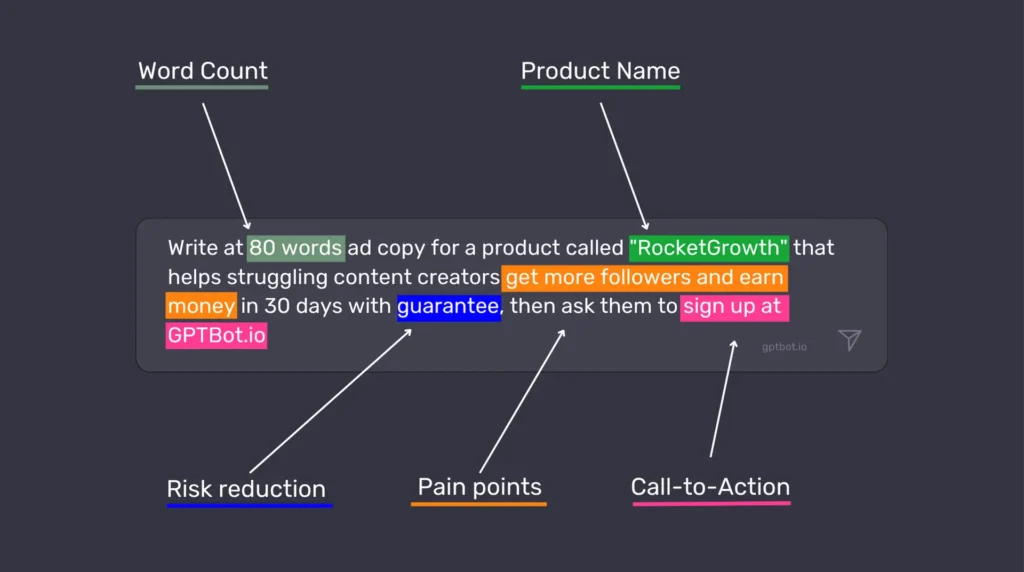
    Why are prompts crucial for effective communication with ChatGPT?

    The way you phrase your prompt quite literally shapes the reality that ChatGPT operates in. This is not an exaggeration – it’s how these models work.

    Let me give you a quick example. If you ask, “Tell me about dogs,” you’ll get general information about dogs as a species. But if you ask, “I’m thinking about getting a Border Collie for my small apartment in the city. What should I consider?” you’re going to get a much more specific and useful response tailored to your situation.

    Effective prompts matter for several reasons:

    • They save time by getting you closer to the answer you need on the first try
    • They unlock capabilities that aren’t apparent with basic questions
    • They help avoid misunderstandings and irrelevant information
    • They allow you to tap into the model’s knowledge in much more specific ways

    Learning to craft good prompts is like learning to use a search engine effectively – it’s a skill that compounds over time and makes every interaction more valuable.

    III. Tips for Crafting Effective Prompts

    Be specific with your request

    Vague prompts lead to vague answers. It’s as simple as that.

    Instead of asking “How can I improve my website?” try something like “What are 5 ways to reduce the bounce rate on my e-commerce website that sells handmade jewelry?”

    The more specific you are, the more targeted and useful the response will be.

    This means including relevant details like:

    • Your goal or the problem you’re trying to solve
    • Any constraints or requirements
    • The format you want the answer in
    • The level of detail you’re looking for

    For example, compare these two prompts:

    ❌ Bad prompt: “Write me an email.”

    ✅ Good prompt: “Write me a friendly email to a client explaining that their project will be delayed by two weeks due to supply chain issues. Keep it under 200 words and include an offer for a 5% discount on their next order.”

    See the difference? The second prompt gives ChatGPT enough guidance to create something genuinely useful without requiring multiple back-and-forth exchanges.

    Provide context and background information

    ChatGPT doesn’t know anything about you, your business, or your specific situation unless you tell it. Providing context helps the AI understand the bigger picture and tailor its response accordingly.

    This might include:

    • Who you are and who you’re communicating with
    • What you’ve already tried
    • Relevant background information
    • Industry-specific context
    • Your level of expertise in the subject

    For instance, if you’re asking for help with a marketing strategy, mentioning that you’re a small business with a limited budget targeting retirees will result in very different advice than if you’re an established brand looking to reach Gen Z.

    Think of it this way: you’re not just asking a question, you’re setting a scene that helps ChatGPT understand where you’re coming from and what would be most helpful to you.

    Use explicit constraints and guidelines

    One of the most powerful techniques for getting great responses is to clearly state any constraints or guidelines you want ChatGPT to follow.

    This might include:

    • Word count or length requirements
    • Tone and style preferences
    • Formatting needs
    • Complexity level (technical vs. simplified)
    • Specific elements to include or exclude

    For example: “Explain quantum computing in simple terms a 10-year-old would understand. Use analogies related to everyday objects, keep each paragraph under 3 sentences, and avoid technical jargon completely.

    These constraints act like guardrails that channel ChatGPT’s responses in the direction you want, making it much more likely you’ll get something usable without extensive editing.

    Experiment with various phrasings and approaches

    ChatGPT is not perfect, and sometimes the way you phrase a question can drastically change the quality of the response. If you’re not happy with an answer, try asking again with different wording.

    Some variations to try:

    • Change your request from a question to a directive: “Tell me about…” vs. “Explain…”
    • Ask for the same information but from different perspectives
    • Request the information in a different format (bullet points vs. paragraphs)
    • Ask for examples or analogies if a concept isn’t clear

    Don’t be afraid to iterate and refine your prompts. Each interaction teaches you a little more about how to communicate effectively with AI, and what works best for your specific needs.

    IV. Advanced Hacks and Techniques

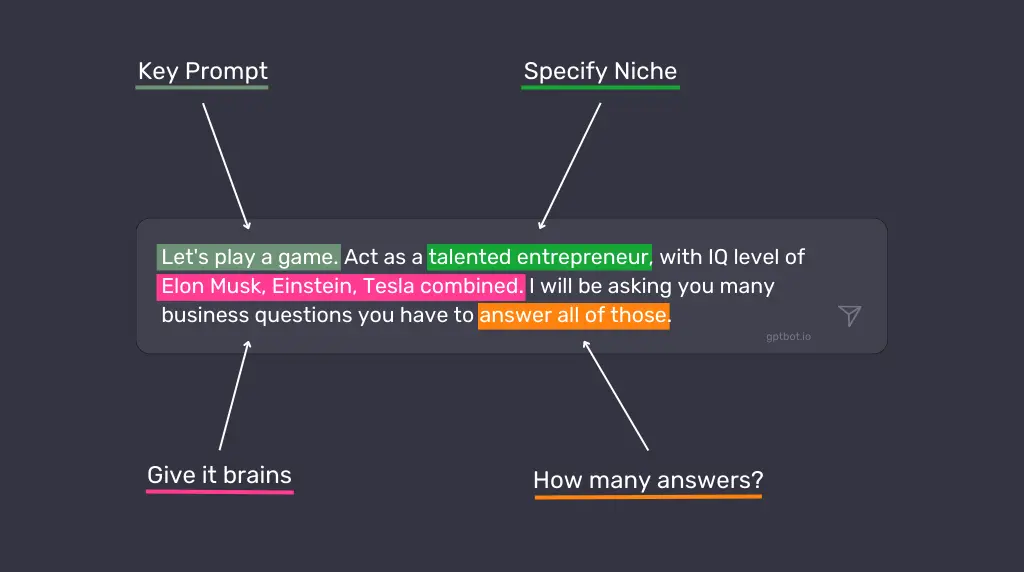
    System message for context setting

    This is where things get really interesting. ChatGPT has a feature called “system messages” that allows you to set the overall context for your conversation. Think of it as setting the stage before the actual dialogue begins.

    For example, you might start with: “You are an expert copywriter specialized in writing compelling product descriptions for luxury watches. Your tone is sophisticated yet accessible, and you excel at highlighting the craftsmanship and heritage of timepieces.

    This primes ChatGPT to respond from that specific perspective throughout your conversation, which is incredibly useful for getting consistent, targeted responses.

    System messages work best when they:

    • Define a clear role or expertise for ChatGPT
    • Establish the tone and style you want
    • Provide any ongoing constraints or guidelines
    • Set expectations for how detailed responses should be
    Step-by-step instructions for complex tasks

    When you need ChatGPT to perform a complex task, breaking it down into sequential steps can dramatically improve the results.

    For example, instead of “Help me create a business plan,” try:

    I need help creating a business plan for my new dog walking service. Please approach this in the following steps:

    1. First, outline the key sections a basic business plan should include
    2. Then, ask me questions about my business idea to gather necessary information
    3. Based on my answers, help me draft each section
    4. Finally, suggest ways to make the plan more compelling to potential investors

    This approach:

    • Makes the task more manageable for both you and the AI
    • Ensures important elements aren’t overlooked
    • Creates a more interactive and productive conversation
    • Often results in more thoughtful, detailed responses

    Role-playing for creative scenarios

    Getting ChatGPT to adopt a specific persona can unlock creative possibilities and specialized knowledge. This technique is particularly useful for brainstorming, writing, and exploring different perspectives.

    Some effective role-prompts include:

    • “Act as a skeptical venture capitalist reviewing my business idea. What questions or concerns would you have?”
    • “Take on the role of a child psychology expert explaining how to discuss divorce with a 6-year-old.”
    • “Respond as if you’re a historical figure from the 1800s encountering modern technology for the first time.”
    • “Play the role of a UX research director evaluating my app prototype. Based on these user testing results [results], identify the three most critical usability issues, explain how they might impact our core metrics (retention, engagement, conversion), and outline a research plan to validate potential solutions. Your response should balance immediate fixes with longer-term strategic improvements.”
    • “Assume you’re a financial advisor who specializes in helping creative professionals plan for irregular income streams. I’m a freelance photographer making between $45,000-70,000 annually, with significant seasonal fluctuations. I have $15,000 in credit card debt, $5,000 in savings, and need to establish both an emergency fund and retirement planning. Create a month-by-month financial roadmap for my next year that accounts for income uncertainty while making meaningful progress toward financial stability.”

    This approach helps ChatGPT generate more authentic and nuanced responses that reflect particular viewpoints or expertise. Just remember that while the AI can simulate different perspectives, it’s still drawing on patterns in its training data rather than actual experience.

    The power of iterations and refining responses

    Sometimes the best approach is an iterative one.

    Start with a basic prompt, evaluate the response, and then build on it with follow-up prompts that refine and improve the output.

    For example:

    1. Initial prompt: “Write a product description for my new organic shampoo.”
    2. After receiving the response: “This is good, but can you make it more emotional and emphasize the sustainable packaging?”
    3. Then: “Now add a section about how it’s suitable for all hair types.”

    This back-and-forth process:

    • Allows you to guide the development of complex content
    • Helps you discover what aspects need more attention
    • Often results in higher quality final output than trying to get everything perfect in a single prompt
    • Mimics the natural collaborative process you might have with a human assistant

    InstructGPT: Asking ChatGPT to think step by step

    One of the most powerful techniques for complex problems is to explicitly ask ChatGPT to work through its reasoning process step by step. This approach, sometimes called “chain-of-thought prompting,” can lead to more accurate and thorough responses.

    For example: “Solve this math problem, explaining your thought process at each step: If a store offers a ‘buy 2, get 1 free’ promotion, and each item costs $15, how much would you pay for 7 items?”

    By instructing ChatGPT to show its work:

    • You can spot potential errors in reasoning
    • The AI tends to be more careful and methodical
    • You get insight into how the answer was derived
    • The response becomes educational as well as informative

    This technique is particularly valuable for math problems, logical reasoning, coding tasks, and any situation where the process matters as much as the final answer.

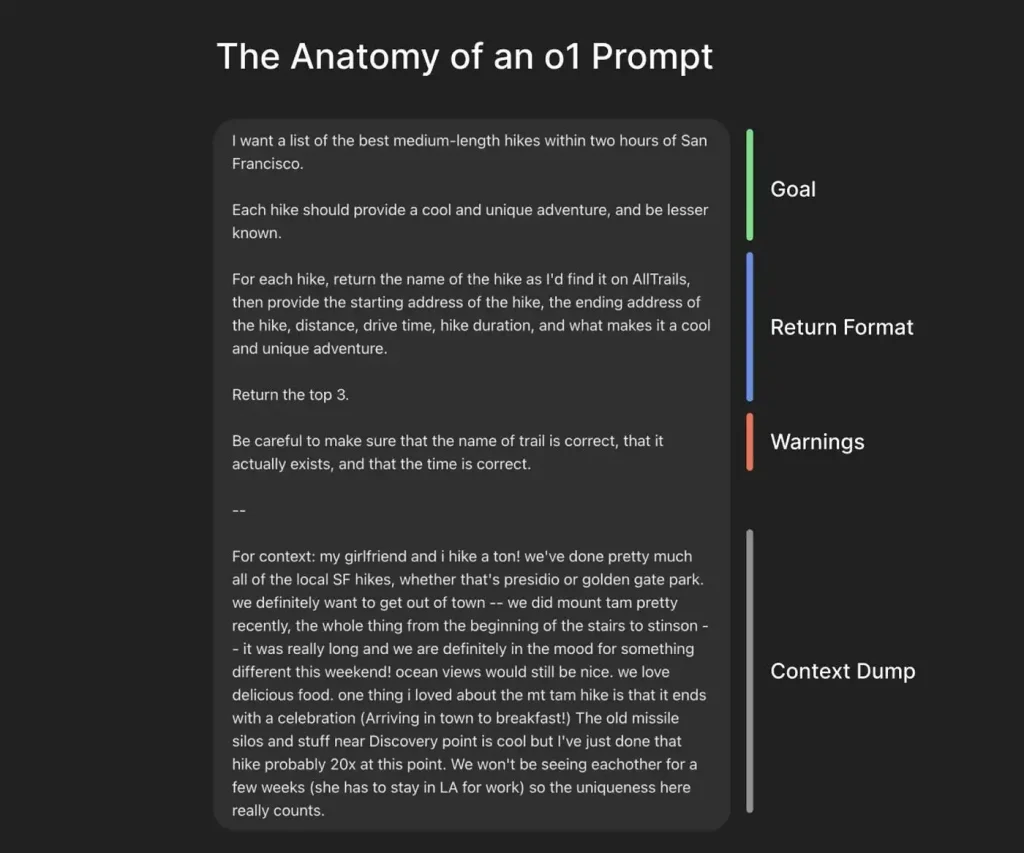
    The anatomy of an effective prompt (by OpenAI’s co-founder)

    OpenAI co-founder Greg Brockman recently shared an excellent breakdown of what he calls an “o1 prompt” – a highly effective prompt structure that consistently delivers quality outputs, especially when using ChatGPT’s o1 model.

    As shown in his example, the best prompts typically contain 4 key components:

    1. A clear goal statement
    2. Specific return format instructions
    3. Important warnings or constraints
    4. Relevant context

    Notice how the hiking prompt begins with the precise request, then adds specific requirements about the type of hikes wanted, followed by exactly how the information should be structured, potential pitfalls to avoid, and finally personal context that helps tailor the response.

    This structured approach eliminates ambiguity and gives ChatGPT all the information it needs to deliver a highly personalized, useful response.

    V. Avoiding Common Pitfalls

    Being too vague or open-ended

    One of the biggest mistakes people make is asking questions that are so broad or vague that ChatGPT has to guess what you want. Questions like “Tell me about marketing” or “How do I get better at my job?” give the AI too much room to interpret.

    When your prompt is vague:

    • The response will likely be generic and surface-level
    • You’ll probably need to ask multiple follow-up questions
    • You might get information that’s not relevant to your actual needs

    Instead, take a moment to think about what specific aspect of the topic you’re interested in, and what you plan to do with the information. Then craft your prompt accordingly.

    Overloading the prompt with information

    While context is important, there’s such a thing as too much information. Extremely long prompts with excessive details can confuse the model or cause it to focus on the wrong aspects of your request.

    Signs you might be overloading your prompts:

    • ChatGPT seems to ignore important parts of your request
    • Responses address only the first or last portion of your prompt
    • The AI seems confused or asks for clarification

    Aim for a balance – include relevant details but be concise. If you have a lot of information to share, consider breaking it up into a more conversational exchange rather than one massive prompt.

    Misinterpreting output as factual information

    This is not so much a prompt issue as a usage issue, but it’s critical: ChatGPT is not a search engine or database. It generates responses based on patterns in its training data, which means it can produce plausible-sounding but incorrect information.

    When using ChatGPT:

    • Be skeptical of specific facts, figures, dates, and quotes
    • Verify important information with reliable sources
    • Use the AI for idea generation and drafting rather than as the final authority
    • Be especially careful with technical, medical, legal, or financial information

    You can mitigate this somewhat by asking ChatGPT to cite sources or indicate when it’s unsure, but remember that even these citations need verification.

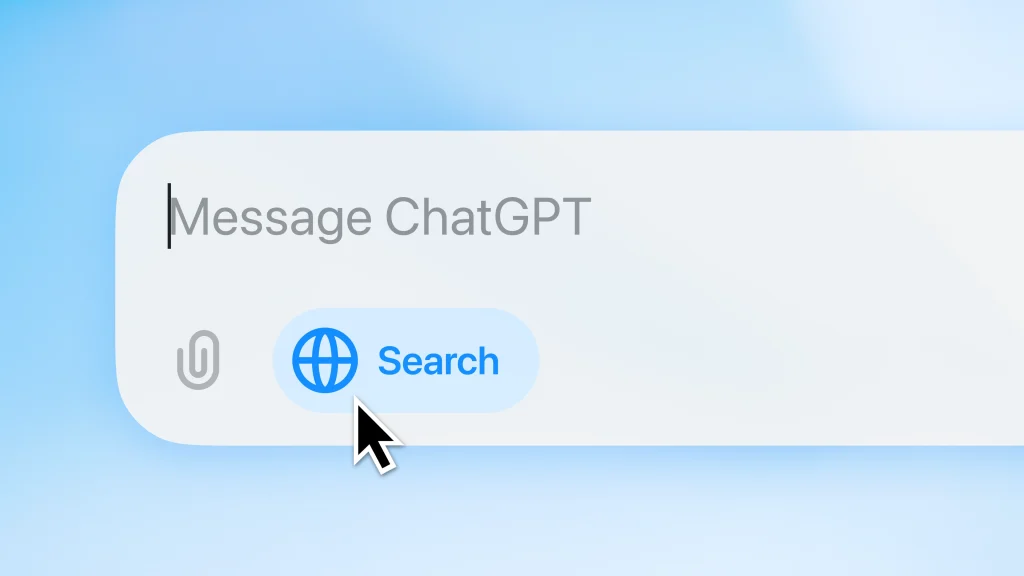
    UPDATE: Since October 2024, ChatGPT has introduced ChatGPT Search, which delivers updated, live information – addressing one of the biggest limitations of the original version.

    This feature allows ChatGPT to access current information from the web, making it more useful for questions about recent events, new products, or evolving topics.

    This is a game-changer because previously, ChatGPT was limited to information it learned during training. Now it can provide more timely and accurate responses to questions about current events and developments.
    VI. Real-life ChatGPT Examples and Case Studies

    Analyzing successful prompts

    Let’s look at some examples of prompts that work particularly well, and understand why.

    Example 1: Writing Assistant

    ❌ Poor prompt: “Help me write better.”

    ✅ Effective prompt: “I’m writing a cold email to potential clients for my graphic design services. My target audience is small business owners in the food industry. Write an email template that highlights the importance of strong branding, keeps the tone friendly but professional, and includes a clear call to action. The email should be around 200 words.”

    Why it works: This prompt provides specific context (cold email, graphic design services), identifies the audience (small business owners in food industry), gives clear parameters (tone, length, elements to include), and has a defined purpose.

    Example 2: Research Help

    ❌ Poor prompt: “Tell me about climate change.”

    ✅ Effective prompt: “I’m preparing a 10-minute presentation for high school students about climate change. Can you help me create an outline that covers the basic science, three major impacts, and two actionable steps students can take? Please keep the language simple but not condescending, and include one surprising fact or statistic for each section to maintain interest.”

    Why it works: This specifies the audience (high school students), format (10-minute presentation), exact structure needed (science, impacts, actions), tone requirements (simple but not condescending), and even includes a specific request for engaging elements (surprising facts).

    Lessons learned from ineffective prompts

    We can learn just as much from analyzing prompts that didn’t work well:

    Example 1: The E-commerce Strategist

    ❌ Ineffective prompt: “Help me increase my online sales.”

    Problem: No information about the business type, current situation, target market, or specific challenges. It’s impossible to provide tailored, actionable advice.

    ✅ Improved version: “I run a small online boutique selling handmade leather accessories with average monthly sales of $3,000. Our conversion rate has dropped from 3.2% to 1.7% over the last quarter despite steady traffic. Our target audience is professionals aged 30-45 who value quality and craftsmanship. Can you suggest 5 specific strategies to improve our product page conversion rate, focusing on elements we could implement before the holiday shopping season begins?”

    Example 2: The Content Creator

    ❌ Ineffective prompt: “Write me an article about leadership.”

    Problem: No indication of length, style, audience, purpose, or specific aspects of leadership to focus on.

    ✅ Improved version: “Write me a 700-word article about servant leadership for my company blog. The audience is middle managers in the tech industry. Focus on practical ways to implement servant leadership principles in day-to-day team management. Use a conversational tone with 2-3 real-world examples, and include a brief introduction explaining what servant leadership is.”

    The key lessons from these examples:

    1. Include all relevant information in your initial prompt
    2. Specify format, length, and style requirements
    3. Identify your audience and purpose
    4. Break complex requests into clear components
    5. When appropriate, provide examples of what you’re looking for

    VII. Conclusion

    Recap of key points and takeaways

    We’ve covered a lot of ground in this guide to mastering ChatGPT prompts.

    Here are the essential takeaways:

    • Prompts are instructions that guide ChatGPT toward the type of response you want
    • Specificity is your friend – vague prompts lead to vague responses
    • Context matters – ChatGPT doesn’t know anything about you or your situation unless you tell it
    • Constraints and guidelines help channel the AI’s responses in useful directions
    • Advanced techniques like system messages, role-playing, and step-by-step instructions can dramatically improve results
    • Iteration is often the best approach for complex tasks
    • Always verify factual information from ChatGPT with reliable sources

    The difference between a basic user and a power user often comes down to prompt crafting skills. With practice, you’ll develop an intuition for how to phrase your requests to get the most helpful, relevant responses.

    Encouragement to experiment and learn through practice

    The best way to get better at crafting prompts is simple: practice.

    ChatGPT is remarkably forgiving – there’s no penalty for trying, adjusting, and trying again. Each interaction is an opportunity to refine your approach.

    Start by taking a prompt you’ve used before and asking yourself:

    • How could I make this more specific?
    • What context might help ChatGPT better understand what I need?
    • Are there constraints or guidelines that would improve the response?

    Then experiment with different variations and see what works best. Pay attention to which prompts generate the most useful responses, and look for patterns you can apply to future interactions.

    Remember, effective prompt crafting is not just about getting better responses from ChatGPT – it’s about learning to communicate your needs clearly and specifically, a skill that has value far beyond AI interactions.

    So go ahead, start experimenting, and watch as your AI conversations transform from basic Q&A to truly valuable exchanges that save you time and generate insights you might not have discovered on your own. Your prompt is powerful, use it wisely!