Category: Guide

  • Master AI Vibe Coding in 10 Steps [2025 Guide + Tools]

    Master AI Vibe Coding in 10 Steps [2025 Guide + Tools]

    Feel that spark of an app idea, only to get stuck in coding complexities? You’re not alone. For too long, turning brilliant concepts into working software meant wrestling with syntax and debugging headaches.

    Enter vibe coding, the game-changing approach coined by Andrej Karpathy in early 2025. Rather than focusing on technical details, vibe coding lets you describe your vision while AI handles the heavy lifting. Simply communicate the feel and purpose of what you want to build, and watch as the foundation takes shape.

    This shift is opening doors for non-coders with great ideas and helping experienced developers skip repetitive tasks to focus on creative problem-solving.

    The 10 Essential Tips for Mastering Vibe Coding

    Tip 1: Define your vision clearly
    Alright, this one’s foundational.

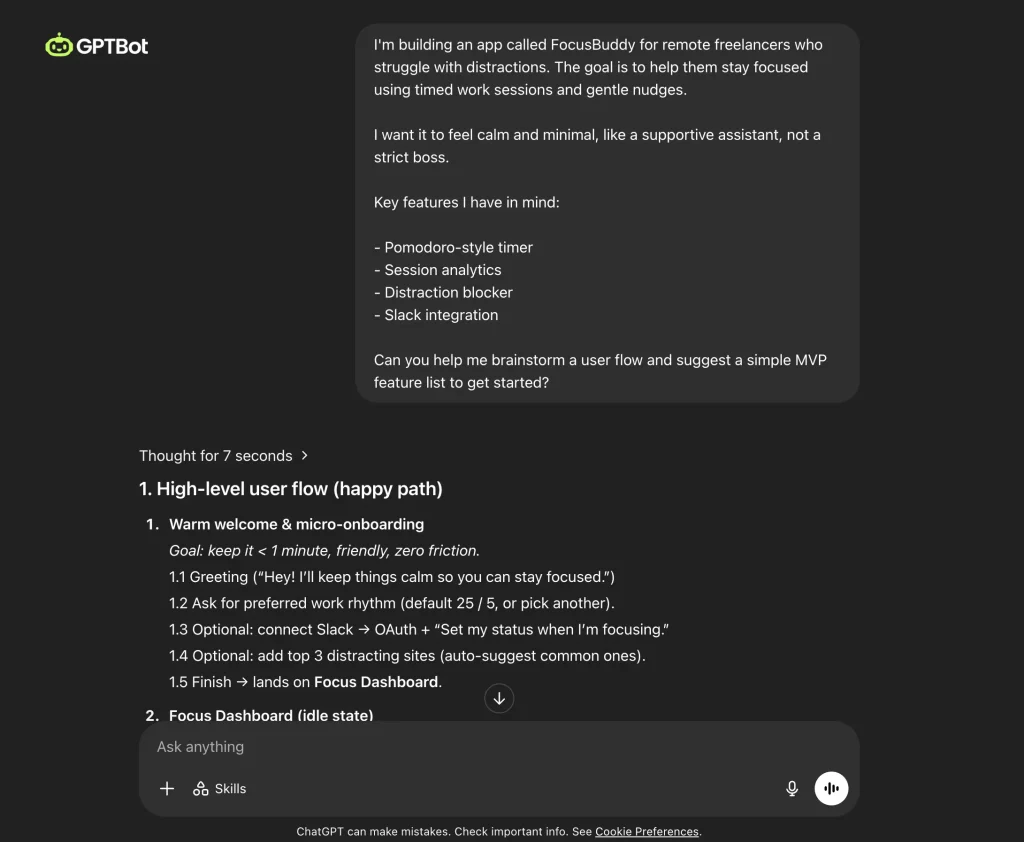
    Before you even think about asking an AI to write a single line of code, you need to know exactly what you’re trying to build. And I mean, crystal clear.

    Think of it like this: if you ask a friend to grab you “something to eat” without any more detail, you might get a five-star meal, or you might get a dusty packet of crackers from the back of their cupboard. AI, as smart as it’s getting, works on the same principle.

    It can’t read your mind. If your instructions are vague or messy – “build me a cool social app” – the code you get back is likely to be just as unfocused.

    So, take the time upfront:

    • What should this app do?
    • Who is it for?
    • What are the absolute must-have features?
    • What should it feel like to use?

    The more detailed your own understanding and vision, the better you can guide the AI. Funnily enough, you can even use an AI writing assistant (like ChatGPT, Claude, Grok, Gemini) to help you formulate these initial ideas, list your goals, and map out what you want before you jump into the coding-specific AI tools.

    Get specific. Your future self will thank you when the AI delivers something remarkably close to what you actually pictured.

    Tip 2: Plan your UI/UX first
    So, you’ve got a clear idea of what your app should do. Brilliant.

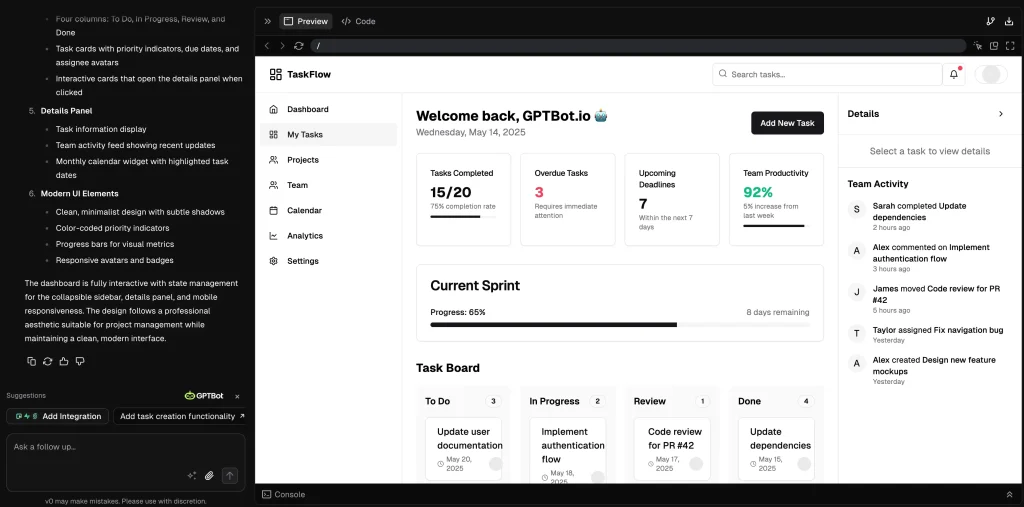
    Now, before you get the AI to start churning out code, think about how people will actually use it and what it will look like. This is all about the User Interface (UI) – what they see and interact with – and User Experience (UX) – how it feels to use.

    Why bother if the AI can just build it? Well, an AI can build a house, but it won’t automatically know if the doors should be person-sized or mouse-sized, or if the kitchen should be next to the bedroom.

    You need to give it that context. If you dive straight into telling the AI “make a login button” without thinking where it goes, what it looks like, or what happens next, you might get a functional app that’s a confusing mess to navigate.

    • How does someone sign up?
    • What does the main page look like?
    • Where do the important buttons go?

    Thinking this through helps you create a logical flow.

    There are also simple digital tools for wireframing (basic screen layouts), and even some AI tools popping up, like v0 by Vercel, that can help you mock up visuals quickly based on descriptions. The key is to have a blueprint.

    Also, think about consistency from the start.

    Decide on your general style – what should your buttons, menus, and text look like? If you plan for reusable bits and pieces (like a standard button design or a navigation bar) and tell your AI about them, you’ll save a ton of time and get a much more polished result.

    A little bit of visual planning goes a long way in making sure the AI builds something people will actually enjoy using.

    Tip 3: Master your prompts
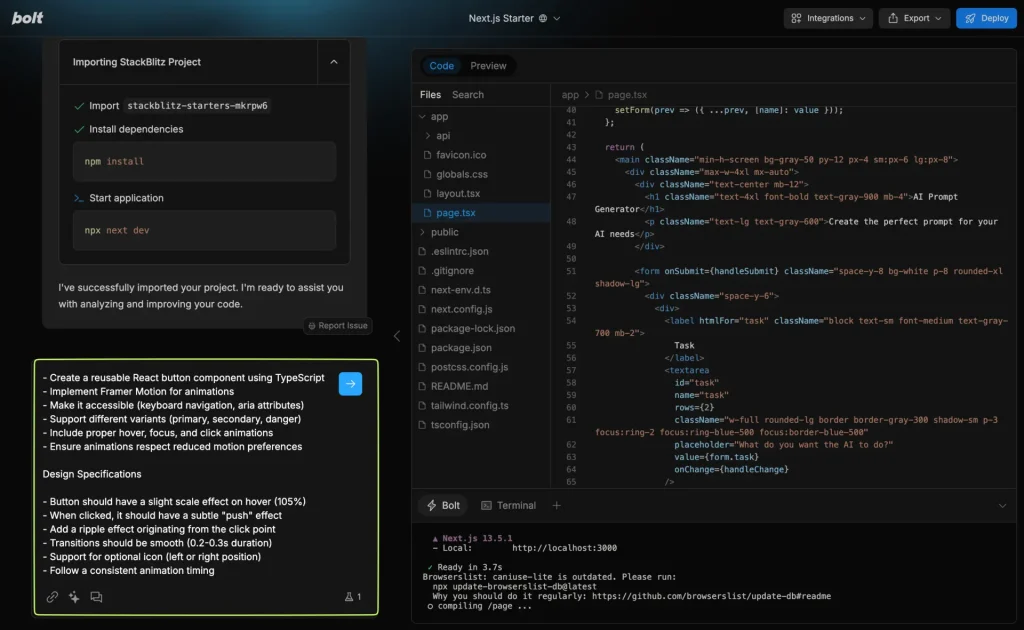
    This is where the real magic of vibe coding happens, and it’s a skill you’ll want to hone: how you “talk” to the AI. Think of yourself as a director guiding a very talented, very literal actor. Your prompts – the instructions you give – are your script.

    If your instructions are vague, like “make a cool button,” the AI will make a button, but it might not be your kind of cool, or even fit what you need.

    You need to be specific.

    • What should the button say?
    • What color should it be?
    • What should happen when someone clicks it?

    The more precise and detailed you are, the better the AI can “see” your vision and build it. It helps to imagine you’re explaining the task to a new team member who’s a capable coder but knows nothing about your project yet. You wouldn’t just say “build the next feature”; you’d give them details, context, and specific requirements.

    Do the same with your AI.

    Don’t be afraid to overcommunicate the key details for a specific piece of work.

    Also, try not to ask for the moon in a single prompt. While some AIs can handle bigger requests, you’ll generally get better results by asking for smaller, more focused pieces of code. We’ll touch more on breaking down big features later, but for now, just remember that clear, detailed instructions for manageable tasks are your best friends.

    And perhaps most importantly, treat it as a conversation. If the AI gives you something that’s not quite right, don’t just scrap it. Look at what it did, then look at your prompt.

    • How could you rephrase it?
    • What extra detail might it have needed?

    Refining your prompts based on the AI’s output is a huge part of getting good at this. It’s less about getting it perfect the first time, and more about skillful back-and-forth.

    Tip 4: Choose your tech stack wisely

    Okay, “tech stack” might sound a bit technical, but it’s just the collection of tools, programming languages, and frameworks you decide to build your project with. And believe it or not, your choice here can hugely impact how well vibe coding works for you.

    Here’s the deal: AI models learn by looking at massive amounts of existing code and documentation out there on the internet. So, if you choose to build with very popular, widely-used technologies, the AI has a much richer library of examples to draw from. This means it’s more likely to generate code that’s effective, up-to-date, and less buggy.

    Think of it like asking for directions. If you ask for directions in a huge, well-mapped city, you’ll get great results. If you ask for directions in a tiny, uncharted village, the map might not be so helpful.

    So, especially when you’re starting out, try to stick with common, well-documented options.

    For web apps, for instance, you often hear about combinations like:

    That’s just an example of the kind of popular, well-supported tools that AI tends to work well with because there’s so much information about them available.

    Does this mean you can’t use vibe coding for something more niche? Not necessarily, but you might find the AI needs a lot more specific guidance.

    And one more thing on this: even though the AI will be writing a lot of the code, it’s really helpful if you have at least a basic understanding of the tech stack you’ve chosen.

    You don’t need to be an expert who could write it all from scratch, but knowing what each part is supposed to do helps you craft better prompts and understand the code the AI gives you. It keeps you in the driver’s seat.

    Tip 5: Iterate, iterate, iterate

    If you’re expecting the AI to spit out a perfectly polished, bug-free, feature-complete application on its very first try… well, you might be setting yourself up for a bit of a letdown. Vibe coding is not usually a one-shot wonder.

    It’s much more of a dance, a back-and-forth.

    The most effective way to work with AI in coding is to embrace an iterative approach. What does that mean? Simply put: get something basic working first, then build upon it and refine it in steps. Think “code first, make it perfect later.”

    Don’t get caught up trying to craft one mammoth prompt that describes every single nuance of a complex feature. Instead, ask the AI to build a simpler, core version. Then, test it out. See what it does. Does it work? Is it close to what you wanted?

    Based on that output, you then go back to the AI with more instructions.

    • “Okay, that’s a good start, but now can you add X?”
    • “That part isn’t quite right, could you change Y to Z?”

    This cycle of prompting, testing what the AI gives you, and then refining your instructions (or the code itself) is key.

    This way of working is actually super powerful. It lets you get working versions of your ideas up and running really quickly, so you can see if you’re on the right track.

    It’s all about making quick progress, getting feedback (even if it’s just your own from trying it out), and then improving step-by-step. It’s much less daunting and often much faster in the long run than trying to get everything flawless from the get-go.

    Tip 6: Understand the code, don’t just copy-paste

    It can be incredibly tempting, especially when the AI generates a huge chunk of code that seems to work, to just grab it, plug it in, and move on. But resist that urge.

    Treating the AI’s output as a mysterious “black box” that you don’t need to understand can lead to headaches down the line.

    Why? Well, AI is not infallible. It can make mistakes, introduce subtle bugs, or sometimes write code that works but is not the most efficient or secure. If you haven’t taken the time to understand what it’s doing, you’ll be completely lost when something goes wrong or when you need to make changes later.

    So, make it a habit to actually read the code the AI generates. Even if you don’t catch every single nuance, try to get a general idea of how it’s structured and what each part is supposed to achieve.

    • What’s the flow of data?
    • What are the key functions or pieces doing?

    And here’s a pro-move: if there’s a section of code you don’t understand, ask the AI to explain it to you. Modern AI coding assistants are pretty good at breaking down what their code does in plain language.

    You can ask things like:

    • “Can you explain what this function does?”
    • “Why did you choose to do it this way?”

    Remember, you are still the architect of your project. The AI is an incredibly powerful tool, a fantastic assistant, but it’s your name on the final product. Maintaining that understanding and control is crucial for building robust, reliable software. You’re still in charge, and that means knowing what’s going into your creation.

    Alright, next up is a tip that will save you so much potential frustration.

    Seriously, this one is a lifesaver.

    Tip 7: Leverage Git & GitHub religiously
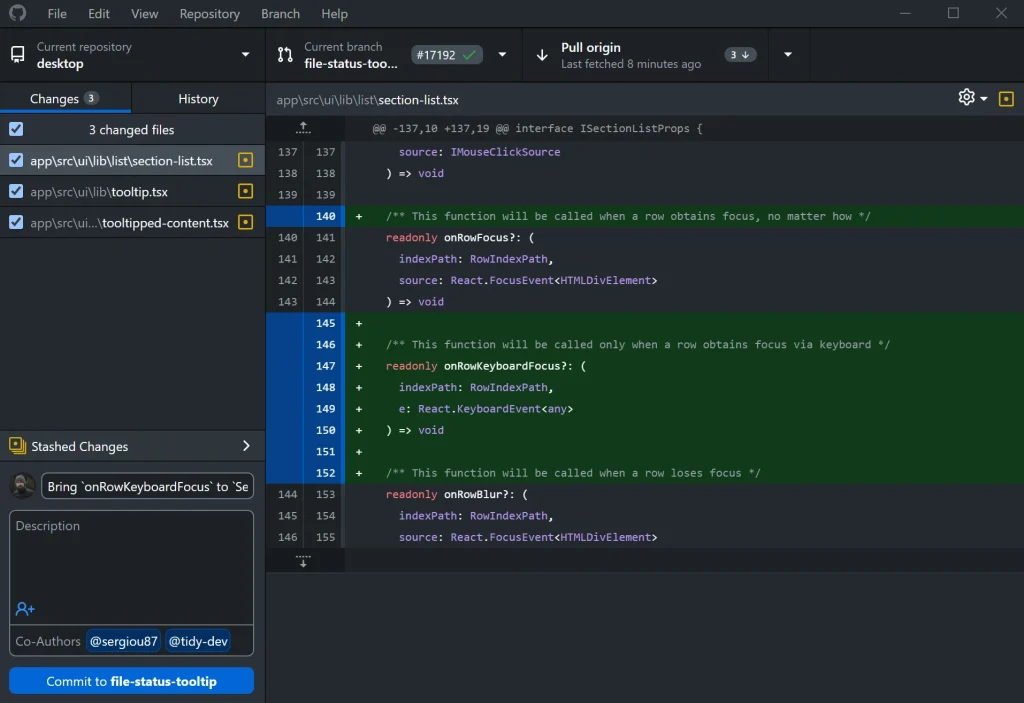
    If you’re not already familiar with Git, think of it as the ultimate “undo” button for your entire project, combined with a detailed history book of every change you (or the AI) makes. When you’re vibe coding, and the AI is generating and modifying code, sometimes at a rapid pace, Git becomes absolutely essential.

    Why “religiously”? Because AI, for all its brilliance, can sometimes misunderstand a prompt or make changes that have unintended consequences.

    It might delete something important, or take a feature in a completely wrong direction. Without a way to easily roll back to a previous, working version, you could find yourself in a real pickle, trying to manually untangle what the AI just did.

    Here’s how to make it work for you:

    • Learn the basics of Git: If Git is new to you, there are tons of great beginner tutorials out there. You don’t need to be a Git wizard, but knowing how to save (or “commit”) your changes, and how to go back to an older version, is crucial.
    • Commit frequently: Don’t wait until the end of the day or after a massive coding session.
      • Did the AI just help you successfully implement a small new feature? Commit it.
      • Did you just try an experimental change with AI and it worked? Commit it.
      • About to ask the AI to do a big refactor? Definitely commit your current working version before you do that.
    • Write clear commit messages: When you save a version, add a short note describing what changed (e.g., “Implemented basic user login” or “Fixed bug in navigation bar”). This makes it easy to find specific versions if you need to go back.
    • Use a platform like GitHub (or GitLab, Bitbucket): These platforms let you store your Git project (your “repository”) online. This is not only great for backup but also if you ever want to collaborate with others.

    Think of Git as your safety net.

    It gives you the freedom to experiment with the AI, knowing that if things go a bit haywire, you can always rewind to a point where everything was working perfectly.

    Tip 8: Break down complex features

    This one builds nicely on some of the earlier points about clear prompts and iteration.

    When you’re tackling a big, complex feature for your application, avoid the temptation to describe the whole thing to the AI in one go and expect it to deliver the entire finished piece perfectly.

    Think of it like asking someone to build a whole car in one step versus asking them to build the engine, then the chassis, then the wheels, etc. AI, much like humans, works better when it can focus on smaller, well-defined tasks.

    If you give an AI a massive, sprawling prompt like “build me a complete e-commerce system with user accounts, product listings, a shopping cart, payment integration, and an admin panel,” it’s far more likely to get overwhelmed, miss crucial details, or produce code that’s buggy or just plain weird (what some people call “AI hallucination”).

    Instead, break that big feature down into “micro-deliverables”, tiny manageable pieces.

    For example, with that e-commerce system:

    1. First, you might ask the AI: “Create the database structure for user accounts.”
    2. Then: “Build a user registration form with fields for email and password.”
    3. Next: “Write the code to save new user registrations to the database.”
    4. And then: “Develop a login function that checks credentials against the database.”

    See the pattern? Each request is focused and builds upon the last.

    This approach has several advantages:

    • Better AI performance: The AI can dedicate its “attention” to getting that one specific part right.
    • Easier to test & fix: If one small part goes wrong, it’s much simpler to identify the issue and correct it, either by adjusting your prompt or the code directly.
    • You stay in control: It feels less like you’re handing over the reins entirely and more like you’re strategically guiding the AI, piece by piece.

    This method of breaking things down is a cornerstone of agile thinking in software development, and it applies beautifully to vibe coding.

    Small steps, frequent checks, and building complexity gradually – it’s a much smoother and more reliable way to get to your amazing final product.

    Tip 9: Manage AI chat context wisely

    This is a subtle but super important one for getting consistent results when you’re deep in a vibe coding session.

    You know how when you’re having a really long conversation with someone, they might forget a small detail you mentioned an hour ago? AI tools can be a bit like that.

    They have something called a “context window,” which is basically their short-term memory for the current conversation.

    They can only keep track of so much of the back-and-forth. If your chat thread gets incredibly long – like, hundreds of messages back and forth as you build out feature after feature – the AI might start to “forget” instructions, patterns, or decisions you made much earlier in the chat. This can lead to it suddenly generating code that doesn’t match the style you were using, or it might overlook a constraint you set previously.

    So, how do you manage this?

    • Start fresh for new major tasks: When you’re shifting gears to work on a completely new, big feature or a distinct part of your application, it’s often a good idea to just start a new chat session with your AI. This gives it a clean slate, focused only on the current task.
    • Briefly re-orient the AI: If you do start a new chat, give the AI a quick reminder of the immediate context. Something like: “Okay, we’re now going to work on the user settings page. I have settings.js and user_data.py files. I want to add a feature to change the email address.” You don’t need to re-explain the entire project, just the relevant bits for what you’re about to do.
    • Keep your code in smaller files: This helps in a couple of ways. It’s good practice anyway, but it also means when you need the AI to work on a specific part, you can often just give it the context of that smaller file, rather than overwhelming its “memory” with your entire project’s code.
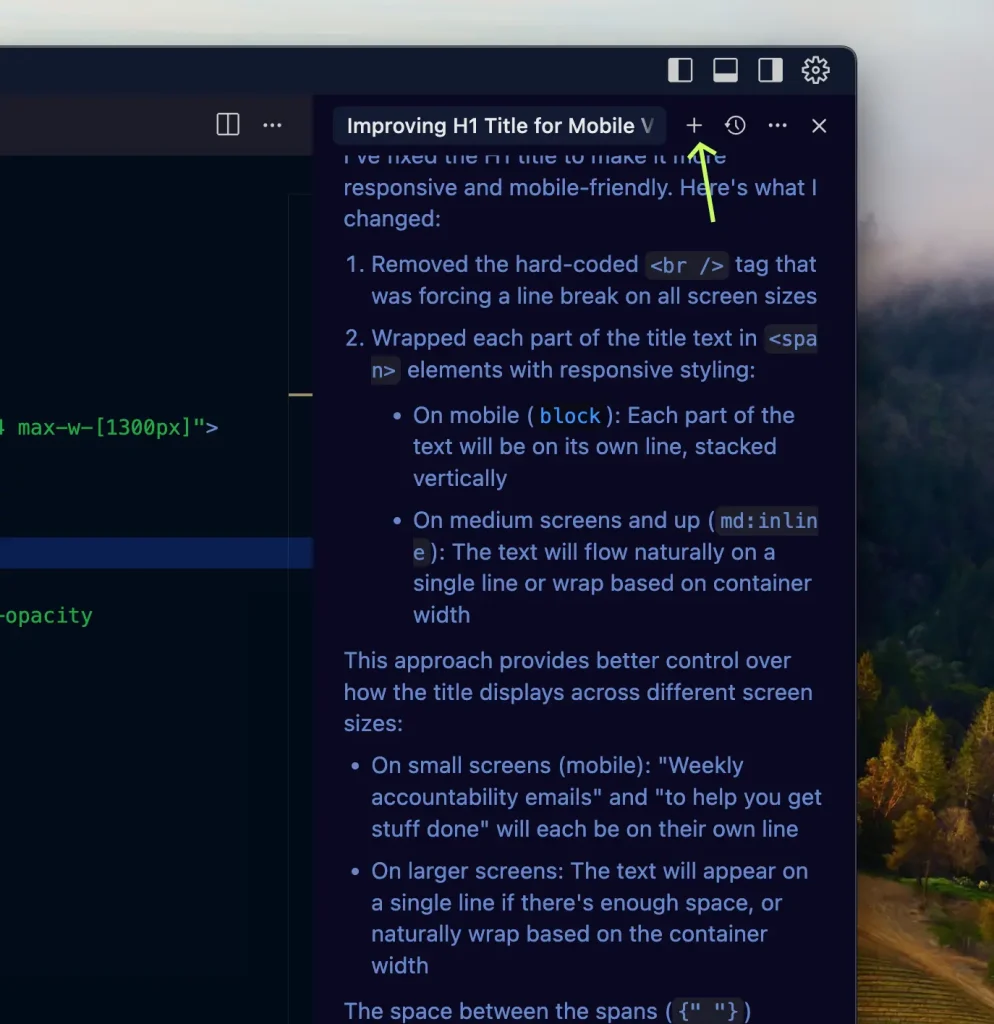
    Think of it as helping the AI focus. By being mindful of its “attention span,” you’ll get more consistent and relevant code, and save yourself the headache of the AI suddenly going off track because the chat got too cluttered.

    Tip 10: Don’t abandon engineering best practices

    Vibe coding is incredibly exciting. It can feel like you’ve suddenly got coding superpowers, and in many ways, you do!

    But with all this newfound speed and AI assistance, it’s important not to throw out the tried-and-true principles of good software engineering.

    The AI is a phenomenal assistant, a productivity booster, but it’s not a replacement for your critical thinking and engineering discipline.

    Here’s what to keep firmly in mind:

    • Security is still your job: AI can generate code quickly, but it might not always be thinking about security vulnerabilities. Always review the code, especially parts that handle sensitive data or user input, for potential security risks. Never ask AI to include things like API keys or passwords directly in the code.
    • Test thoroughly: You can (and should!) ask your AI to help write tests for the code it generates. But don’t stop there. Write your own tests too, particularly for the critical parts of your application. Make sure features work as expected, handle errors gracefully, and don’t break other parts of your system.
    • Be a good debugger: When bugs appear (and they will whether the code is human-written or AI-generated), use your debugging skills. You can certainly paste error messages into the AI chat and ask for help (that’s a great use case!), but understanding how to trace problems and verify fixes is still essential.
    • Care about code quality: Don’t just accept whatever the AI spits out if it looks messy, is overly complicated, or hard to understand. You (or someone else) might need to maintain this code later. Ask the AI to refactor or simplify its suggestions if needed. Strive for clarity and efficiency.
    • You have the final say: Remember, the AI is making suggestions. You are the ultimate decision-maker. If the AI suggests an approach that doesn’t feel right, or if you know a better way to do something, trust your judgment. You can always tweak the AI’s code or guide it towards a different solution.

    Top Vibe Coding Tools in 2025

    If you’re looking to get started with vibe coding, here are a few tools that developers and creators are buzzing about, presented in no particular order:

    1. Cursor:

      • What it is: Think of Cursor as a code editor (the place you write and manage your code) that was built from the ground up with AI deeply woven into its fabric. It’s based on the very popular VS Code, so it feels familiar to many, but it’s supercharged for AI collaboration.
      • Why it’s great for vibe coding: Cursor really leans into letting you use natural language for all sorts of coding tasks. You can ask it to generate new code, edit existing code, explain complex snippets, or even help debug, all by chatting with it or giving it direct instructions within your project. It tries to understand your entire codebase for more relevant help.
      • Good for: Developers who want a dedicated AI-first environment that still offers a lot of control and customization.
    2. Replit:

      • What it is: Replit is a super convenient, browser-based platform where you can write, run, and host your code all in one place – no complex local setup needed. It has strong AI features, often referred to as Replit AI or its “Agent.”
      • Why it’s great for vibe coding: You can describe an app idea in plain English (like “build me a to-do list app that saves tasks”), and Replit’s AI will make a surprisingly good stab at generating the initial code, setting up files, and even getting it ready to deploy. It’s fantastic for quick prototyping and collaborative coding.
      • Good for: Beginners, quick projects, collaborative work, and anyone who loves an all-in-one, in-browser solution.
    3. GitHub Copilot:

      • What it is: Developed by GitHub and OpenAI, Copilot is one of the most well-known AI “pair programmers.” It integrates into many popular code editors (like VS Code, JetBrains IDEs, etc.).
      • Why it’s great for vibe coding: Copilot excels at suggesting lines of code or entire functions as you type, based on the context of what you’re working on and comments you write. It also has a chat interface (Copilot Chat) where you can ask coding questions, get explanations, and ask for code to be generated based on your descriptions.
      • Good for: Developers already comfortable in their existing code editors who want powerful AI assistance for autocompletion, code generation, and in-editor Q&A.
    4. Vercel v0:

      • What it is: This tool from Vercel is specifically focused on the visual side of things – your app’s User Interface (UI).
      • Why it’s great for vibe coding: You describe the UI you want using natural language (e.g., “a clean dashboard header with a logo on the left and user avatar on the right”), and v0 generates the frontend code (often using popular technologies like React and Tailwind CSS). It’s fantastic for rapidly bringing your visual ideas to life.
      • Good for: Quickly prototyping UIs, frontend development, and anyone who wants to see their visual “vibe” turn into code quickly.
    5. Bolt.new (by StackBlitz):

      • What it is: Bolt is an AI-powered tool designed to let you create, edit, and deploy web applications right from your browser. It aims to make building full-stack apps (both the frontend and backend parts) faster and more accessible.
      • Why it’s great for vibe coding: You can prompt Bolt with your app idea, and it will generate the initial codebase. It also includes a runtime environment for testing and can handle deployment. It’s built to speed up the process from idea to a working application.
      • Good for: Rapid prototyping, building full-stack web apps quickly, and those who prefer a browser-based development environment.
    6. Lovable.dev:

      • What it is: Lovable is focused on making app creation accessible, particularly for those who may not have deep coding expertise. It aims to help you turn your ideas into functional applications using AI.
      • Why it’s great for vibe coding: You describe what you want your app to do in plain English, and Lovable’s AI works to generate the application. It often includes visual editing capabilities to refine the AI’s output and emphasizes creating more reliable, production-ready code.
      • Good for: Non-technical founders, designers, or anyone looking to quickly transform an idea into a working app with strong AI assistance, focusing on usability and getting a solid end product.
    7. Windsurf (formerly Codeium):

      • What it is: Windsurf positions itself as a powerful AI collaborator, evolving from the Codeium tool. It uses generative AI models to assist developers deeply within their coding environment.
      • Why it’s great for vibe coding: It offers AI features that can act as an assistant for ongoing tasks (like a “Copilot”) or take on more complex jobs more independently (as an “Agent”). You can use natural language prompts for code explanation, generation, and debugging, and it supports various underlying AI models.
      • Good for: Developers looking for a deeply integrated AI coding partner that can handle a range of tasks from simple assistance to more complex generation and problem-solving.

    Conclusion

    Vibe coding is all about teaming up with AI to build software faster by describing what you want in plain language.

    It’s awesome for boosting creativity and speed, but you can’t just let the AI run wild and expect magic.

    To really master it and get great results, remember this:

    • Be crystal clear: Tell the AI exactly what you need, in detail. Vague instructions = messy code.
    • Small chunks: Break down big ideas into smaller, manageable coding tasks for the AI. Don’t ask it to build everything at once.
    • You’re still the developer: Always read and understand the code the AI writes. You need to catch errors, ensure it makes sense, and make sure it’s secure.
    • Save your bacon (Use Git!): Version control is your best friend. Save your progress frequently so you can easily roll back if the AI takes a wrong turn.
    • Keep good habits: Don’t throw out essential coding practices like testing, debugging, and caring about code quality just because AI is involved.

    In short: Guide the AI smartly, stay in control, and combine its speed with your human expertise. That’s how you make vibe coding work wonders!

  • How to Generate New Business Ideas Using ChatGPT (Full Guide)

    How to Generate New Business Ideas Using ChatGPT (Full Guide)

    I. Introduction

    Remember when coming up with business ideas meant endless coffee-fueled brainstorming sessions? Well, since November 2022, ChatGPT has changed the game. This AI assistant has become a go-to tool for entrepreneurs looking to spark fresh business concepts – and for good reason.

    You might be wondering what makes ChatGPT special for business ideation. Here’s the thing: it’s like having a conversation with someone who’s read every business book, article, and case study out there. Pretty neat, right? When you chat with it, you’ll find yourself making connections you might never have considered on your own.

    But let’s be real for a minute. ChatGPT is not some magical business oracle and has its limitations. It won’t tell you if your idea will succeed or fail. Think of it more as a really knowledgeable friend who can help you explore possibilities. It’s great at suggesting options, but you’ll need to bring your own experience and judgment to the table.

    You know what makes the biggest difference? How you work with it. Getting solid business ideas from ChatGPT is a bit like being a good interviewer – you need to ask the right questions and guide the conversation. Sometimes the best insights come from asking something in a slightly different way or building on an unexpected response.

    In this guide, we’ll walk through exactly how to get the most out of ChatGPT for business ideation. Whether you’re starting your first venture or adding to your business portfolio, you’ll learn practical ways to use this tool to generate and refine your ideas.

    Read also: Mastering ChatGPT: How to Craft Effective Prompts (Full Guide)

    II. Ask Open-Ended Questions

    When starting a brainstorming session with ChatGPT, it’s best to begin with broad, open-ended questions. This allows you to explore a wide range of possibilities before narrowing your focus.

    Some examples of the type of open-ended questions you can ask include:

    • “What are some promising new business ideas that could succeed in the coming years?”
    • “What new trends or emerging markets could provide opportunities for new businesses and startups?”
    • “What are some common needs, problems or frustrations that could be addressed by a new product or service?”
    • “What current gaps exist in the marketplace that provide an opening for a new business?”
    • “What are some ways I could combine [existing idea X] with [idea Y] to create a new innovative business?”

    The key is asking questions that do not limit the possibilities or pre-suppose any one direction. You want to open the idea floodgates and get ChatGPT to provide as wide a range of options as possible given no constraints.

    To get diverse suggestions, you can try reframing the same core question in multiple ways. And don’t be afraid to toss out and iterate on 5, 10 or even 20 open-ended questions. ChatGPT is happy to provide additional possibilities with each prompt.

    The goal of this phase is simply to get the broadest view and stimulate your own thinking. Be sure to write down any promising ideas or directions that come to mind as you review ChatGPT’s possibilities.

    After generating a list, you can then start prioritizing and refining it by exploring ideas tailored to your own interests, skills and resources.

    III. Explore Based on Interests or Passions

    Once you have a broad list of new business ideas from ChatGPT, you can start narrowing it down by exploring directions tailored to your own interests and passions.

    The AI will provide more relevant suggestions when you prompt it with information about your background, skills, hobbies or areas you’re excited about.

    Some example prompts:

    • “What business ideas would allow me to combine my interest in [x] and [y]?”
    • “Given my background in [area], what entrepreneurial ideas would be a good fit for me?”
    • “I’m passionate about [interest]. What kind of business could I start that is related to this?”
    • “I love doing [activity]. What needs or gaps exist in the [industry] that my skills could address?”
    • “What business idea would allow me to solve [problem] by applying my knowledge of [topic]?”

    Don’t be afraid to get very specific on your interests, past experience and unique skills. The prompts don’t have to apply to you – this is brainstorming! But providing more details helps narrow the possibilities and gives you ideas that get your creative juices flowing.

    For example, maybe you are interested in fitness and technology.

    You could ask ChatGPT how to combine those into a business, and it may propose ideas like a wearable fitness tracker, customized workout apps, at-home smart gym equipment, and more.

    See which ideas align with your passions and expertise.

    Then you can further refine the most promising options in the next step.

    IV. Refine with Specific Details

    Once you’ve explored some ideas tailored to your interests, you can refine them further by providing ChatGPT with more details on your specific situation. This allows it to generate ideas customized to what you are realistically able to pursue.

    Some examples of details you can provide are:

    • Your background and relevant experience
    • Skills and expertise you have or need to learn
    • Available financial resources and budget
    • Existing equipment, tools, or technology you can leverage
    • Time available to dedicate to a new business
    • Contacts, networks, or partnerships you could utilize
    • Ideal customers or markets based on your location

    With these added constraints and variables, you can prompt for a more focused direction:

    • “Given I have experience with [X] and [Y], plus a budget of [$Z], what online business idea would you recommend I pursue?”
    • “For someone with my background in [area] and coding skills, what kind of mobile app business has strong potential with minimum additional training needed?”
    • “I can dedicate about 10 hours per week to build a side business. What ideas could I validate quickly working on this schedule?”
    • “Based on typical business costs in my city, what food truck business could I start with $50K in savings?”

    The more relevant details you can provide, the more tailored ChatGPT’s responses will be. It allows you to evaluate feasibility and fit given your unique circumstances.

    Be sure to critically analyze any promising ideas that emerge for logistical soundness before moving forward.

    V. Evaluate the Ideas Critically

    While ChatGPT can provide a multitude of possibilities, it is up to you to evaluate each idea with a critical eye before pursuing it further. The AI simply does not have the real-world business experience to determine viability.

    When analyzing the proposed ideas, here are some key factors to consider:

    • Target customers – Is there a real target audience with this need or pain point? Is the market large enough?
    • Market conditions – Does the competitive landscape allow room for a new entrant? How does the idea fit into industry trends?
    • Uniqueness – What would make this stand out from competitors? Does it provide enough differentiation?
    • Execution – Do you have the skills and resources to effectively develop and launch this?
    • Legal/regulatory – Are there any legal or compliance hurdles to entering this market?
    • Funding needs – Can this be self-funded on a bootstrap budget or will outside investment be required?
    • Time to profitability – How long until you could reach a sustainable business level?
    • Personal fit – Does this align with your interests, lifestyle and goals?

    I recommend creating a simple framework to score each idea on these factors to identify the most promising options worth your limited time and resources.

    Be wary of ideas that seem too dependent on unproven assumptions or require skills and funding you don’t have access to. Focus your efforts only on sound opportunities that are executable based on your unique situation.

    With critical analysis, you can determine which of ChatGPT’s many creative ideas have real potential for you.

    VI. Examples of Using This Process

    To make this business idea generation process more concrete, here are a few examples of actual ideas I refined using ChatGPT’s suggestions and my critical analysis:

    Example 1:

    I was interested in healthy eating and wanted to start a business related to food and nutrition.

    I prompted ChatGPT for ideas that combine health and cooking given my budget of $20K. It suggested options like launching a meal prep service, opening a healthy cafe or snack shop, creating an online nutrition coaching business, or selling downloadable healthy recipes.

    Based on my skills, I decided to pursue the online recipe business further. I prompted ChatGPT on how I could create and sell downloadable recipe guides and cookbooks with $20K, including steps to validate demand. It provided ideas like surveying potential customers, building a landing page and collecting emails for pre-orders. I’m now testing a keto recipe guide landing page to gauge interest.

    Example 2:

    My friend has a hobby of building things out of wood and wanted to turn it into a business.

    We prompted ChatGPT on woodworking business ideas for weekends only, given limited space to build things. It suggested options like selling custom furniture on Etsy, teaching woodworking classes, selling DIY kits or wood crafts on Shopify, and offering custom wood engraving or sign making.

    Based on interest and practical factors, he is pursuing the selling of DIY kits further – prototyping some unique designs to test demand.

    Example 3:

    My friend was looking to start a business that would allow her to work remotely. She prompted ChatGPT for online business ideas with low startup costs for someone with social media marketing skills. ChatGPT suggested businesses like affiliate marketing, dropshipping, building online courses/membership sites, or becoming a virtual assistant.

    Based on skills and interests, she decided to build an online social media marketing course teaching others how to grow their brands on platforms like Instagram and TikTok. She’s now created course outlines and is recording the first lessons.

    Example 4:

    I had previously learned web development skills and was looking for a scalable SaaS business idea to pursue. I asked ChatGPT for B2B software startup ideas that could be built by a technical solo founder with $50K starting capital. It proposed ideas like creating tools for user onboarding, payment processing, data enrichment, API integrations, and more.

    I explored the API integration idea further given the growing API economy. To validate demand, I built a simple landing page and showed it to potential customers to gauge interest before fully building out the SaaS product.

    Example 5:

    My brother was interested in starting a pet care business on the weekends. He prompted ChatGPT on pet business ideas that require less than 5 hours per day and low startup costs. It suggested options like dog walking, pet sitting, mobile pet grooming, homemade pet treats, dog training classes and more.

    Based on skills, interests and validation, he is first offering weekend dog walking services while testing out providing homemade dog treat options for his clients.

    VII. Conclusion

    ChatGPT provides an exciting new way to stimulate business idea generation and possibilities through conversational prompts. While it cannot replace human creativity and critical thinking, its ability to make connections and provide options can supplement your ideation process in valuable ways.

    The key is approaching ChatGPT as a starting point, not an end point. Ask open-ended questions first, then explore ideas related to your interests and refine them with your unique constraints. Evaluate each suggestion critically based on real-world viability factors.

    With thoughtful, iterative prompting and human analysis, ChatGPT can expand your thinking and help uncover new directions you may not have considered. You provide the real-world judgment to guide the AI and determine what is executable and worth your limited time and resources.

    I encourage you to try this process during your next brainstorming session. Leave your preconceived notions behind, let your imagination run wild with the possibilities, but ground the final decisions in practical wisdom.

    Looking for additional ready-made prompts to further explore ideas? Check out our collection of business-focused ChatGPT prompts.

  • Mastering ChatGPT: How to Craft Effective Prompts (Full Guide 2025)

    Mastering ChatGPT: How to Craft Effective Prompts (Full Guide 2025)

    I. Introduction

    Ever asked ChatGPT something and got a completely different answer than what you wanted? You’re not alone.

    We’ve spent countless hours working with ChatGPT, and we’ve learned that the secret to getting great results is not just about what you ask – it’s how you ask it.

    ChatGPT is not a mind reader – it’s more like a brilliant but literal friend who needs clear directions. The difference between a generic response and tailored guidance comes down to one thing: your prompt.

    Mastering this skill is becoming essential as AI tools integrate into our daily lives. Whether you’re drafting emails, brainstorming ideas, or solving problems, knowing how to communicate with AI saves hours of frustration and strongly improves results.

    This regularly updated guide contains the latest techniques for creating prompts that get the responses you actually want. As ChatGPT evolves, we’ll keep refreshing these strategies to ensure you’re always getting the most from this powerful tool.

    II. Understanding Prompts

    What is a prompt?

    A prompt is simply the input you give to ChatGPT – your question, request, instruction, or any text you type before hitting enter. But here’s the thing: a prompt is more than just a question. It’s closer to programming than conversation.

    Think about it this way: when you talk to a friend, they have years of context, shared experiences, and human intuition to understand what you mean. They can read your tone, fill in gaps, and make reasonable assumptions about what you’re asking.

    ChatGPT doesn’t have any of that. It only has the words you give it, right then and there.

    A good prompt acts like a set of instructions that guides the AI toward the type of response you’re looking for. It provides context, parameters, and enough information for the model to understand not just what you’re asking, but how you want it answered.

    Why are prompts crucial for effective communication with ChatGPT?

    The way you phrase your prompt quite literally shapes the reality that ChatGPT operates in. This is not an exaggeration – it’s how these models work.

    Let me give you a quick example. If you ask, “Tell me about dogs,” you’ll get general information about dogs as a species. But if you ask, “I’m thinking about getting a Border Collie for my small apartment in the city. What should I consider?” you’re going to get a much more specific and useful response tailored to your situation.

    Effective prompts matter for several reasons:

    • They save time by getting you closer to the answer you need on the first try
    • They unlock capabilities that aren’t apparent with basic questions
    • They help avoid misunderstandings and irrelevant information
    • They allow you to tap into the model’s knowledge in much more specific ways

    Learning to craft good prompts is like learning to use a search engine effectively – it’s a skill that compounds over time and makes every interaction more valuable.

    III. Tips for Crafting Effective Prompts

    Be specific with your request

    Vague prompts lead to vague answers. It’s as simple as that.

    Instead of asking “How can I improve my website?” try something like “What are 5 ways to reduce the bounce rate on my e-commerce website that sells handmade jewelry?”

    The more specific you are, the more targeted and useful the response will be.

    This means including relevant details like:

    • Your goal or the problem you’re trying to solve
    • Any constraints or requirements
    • The format you want the answer in
    • The level of detail you’re looking for

    For example, compare these two prompts:

    ❌ Bad prompt: “Write me an email.”

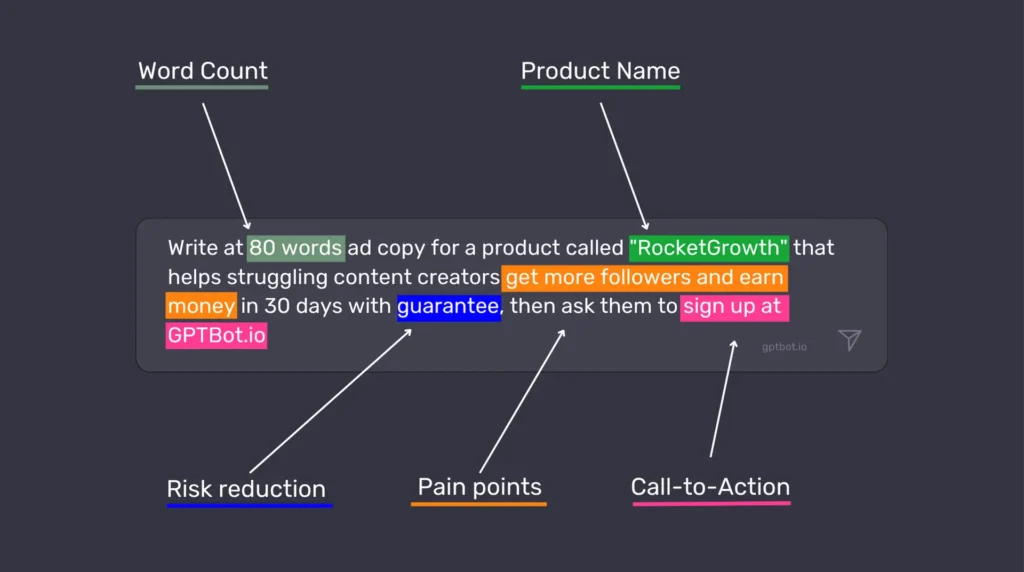
    ✅ Good prompt: “Write me a friendly email to a client explaining that their project will be delayed by two weeks due to supply chain issues. Keep it under 200 words and include an offer for a 5% discount on their next order.”

    See the difference? The second prompt gives ChatGPT enough guidance to create something genuinely useful without requiring multiple back-and-forth exchanges.

    Provide context and background information

    ChatGPT doesn’t know anything about you, your business, or your specific situation unless you tell it. Providing context helps the AI understand the bigger picture and tailor its response accordingly.

    This might include:

    • Who you are and who you’re communicating with
    • What you’ve already tried
    • Relevant background information
    • Industry-specific context
    • Your level of expertise in the subject

    For instance, if you’re asking for help with a marketing strategy, mentioning that you’re a small business with a limited budget targeting retirees will result in very different advice than if you’re an established brand looking to reach Gen Z.

    Think of it this way: you’re not just asking a question, you’re setting a scene that helps ChatGPT understand where you’re coming from and what would be most helpful to you.

    Use explicit constraints and guidelines

    One of the most powerful techniques for getting great responses is to clearly state any constraints or guidelines you want ChatGPT to follow.

    This might include:

    • Word count or length requirements
    • Tone and style preferences
    • Formatting needs
    • Complexity level (technical vs. simplified)
    • Specific elements to include or exclude

    For example: “Explain quantum computing in simple terms a 10-year-old would understand. Use analogies related to everyday objects, keep each paragraph under 3 sentences, and avoid technical jargon completely.

    These constraints act like guardrails that channel ChatGPT’s responses in the direction you want, making it much more likely you’ll get something usable without extensive editing.

    Experiment with various phrasings and approaches

    ChatGPT is not perfect, and sometimes the way you phrase a question can drastically change the quality of the response. If you’re not happy with an answer, try asking again with different wording.

    Some variations to try:

    • Change your request from a question to a directive: “Tell me about…” vs. “Explain…”
    • Ask for the same information but from different perspectives
    • Request the information in a different format (bullet points vs. paragraphs)
    • Ask for examples or analogies if a concept isn’t clear

    Don’t be afraid to iterate and refine your prompts. Each interaction teaches you a little more about how to communicate effectively with AI, and what works best for your specific needs.

    IV. Advanced Hacks and Techniques

    System message for context setting

    This is where things get really interesting. ChatGPT has a feature called “system messages” that allows you to set the overall context for your conversation. Think of it as setting the stage before the actual dialogue begins.

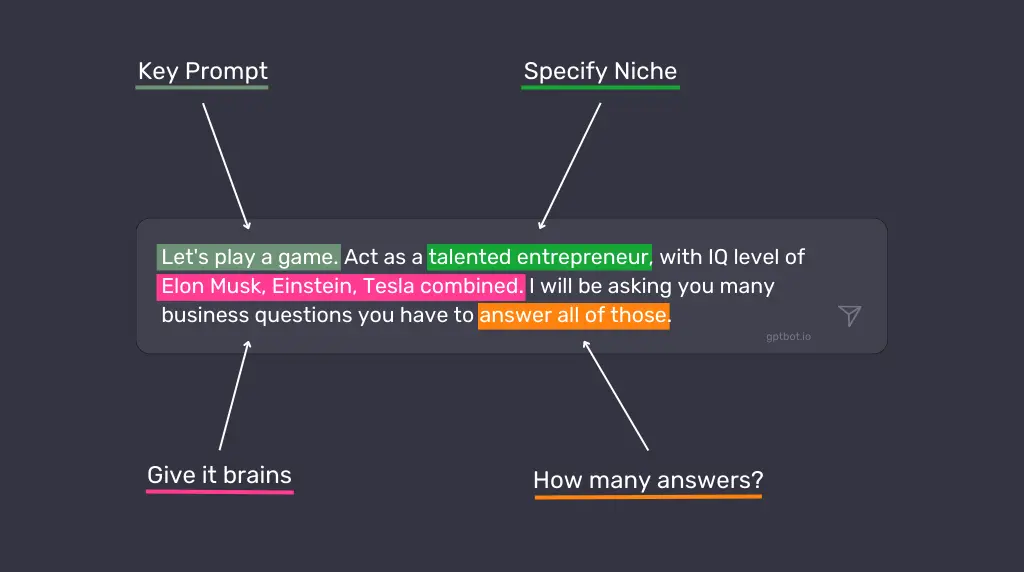
    For example, you might start with: “You are an expert copywriter specialized in writing compelling product descriptions for luxury watches. Your tone is sophisticated yet accessible, and you excel at highlighting the craftsmanship and heritage of timepieces.

    This primes ChatGPT to respond from that specific perspective throughout your conversation, which is incredibly useful for getting consistent, targeted responses.

    System messages work best when they:

    • Define a clear role or expertise for ChatGPT
    • Establish the tone and style you want
    • Provide any ongoing constraints or guidelines
    • Set expectations for how detailed responses should be

    Step-by-step instructions for complex tasks

    When you need ChatGPT to perform a complex task, breaking it down into sequential steps can dramatically improve the results.

    For example, instead of “Help me create a business plan,” try:

    I need help creating a business plan for my new dog walking service. Please approach this in the following steps:

    1. First, outline the key sections a basic business plan should include
    2. Then, ask me questions about my business idea to gather necessary information
    3. Based on my answers, help me draft each section
    4. Finally, suggest ways to make the plan more compelling to potential investors

    This approach:

    • Makes the task more manageable for both you and the AI
    • Ensures important elements aren’t overlooked
    • Creates a more interactive and productive conversation
    • Often results in more thoughtful, detailed responses

    Role-playing for creative scenarios

    Getting ChatGPT to adopt a specific persona can unlock creative possibilities and specialized knowledge. This technique is particularly useful for brainstorming, writing, and exploring different perspectives.

    Some effective role-prompts include:

    • “Act as a skeptical venture capitalist reviewing my business idea. What questions or concerns would you have?”
    • “Take on the role of a child psychology expert explaining how to discuss divorce with a 6-year-old.”
    • “Respond as if you’re a historical figure from the 1800s encountering modern technology for the first time.”
    • “Play the role of a UX research director evaluating my app prototype. Based on these user testing results [results], identify the three most critical usability issues, explain how they might impact our core metrics (retention, engagement, conversion), and outline a research plan to validate potential solutions. Your response should balance immediate fixes with longer-term strategic improvements.”
    • “Assume you’re a financial advisor who specializes in helping creative professionals plan for irregular income streams. I’m a freelance photographer making between $45,000-70,000 annually, with significant seasonal fluctuations. I have $15,000 in credit card debt, $5,000 in savings, and need to establish both an emergency fund and retirement planning. Create a month-by-month financial roadmap for my next year that accounts for income uncertainty while making meaningful progress toward financial stability.”

    This approach helps ChatGPT generate more authentic and nuanced responses that reflect particular viewpoints or expertise. Just remember that while the AI can simulate different perspectives, it’s still drawing on patterns in its training data rather than actual experience.

    The power of iterations and refining responses

    Sometimes the best approach is an iterative one.

    Start with a basic prompt, evaluate the response, and then build on it with follow-up prompts that refine and improve the output.

    For example:

    1. Initial prompt: “Write a product description for my new organic shampoo.”
    2. After receiving the response: “This is good, but can you make it more emotional and emphasize the sustainable packaging?”
    3. Then: “Now add a section about how it’s suitable for all hair types.”

    This back-and-forth process:

    • Allows you to guide the development of complex content
    • Helps you discover what aspects need more attention
    • Often results in higher quality final output than trying to get everything perfect in a single prompt
    • Mimics the natural collaborative process you might have with a human assistant

    InstructGPT: Asking ChatGPT to think step by step

    One of the most powerful techniques for complex problems is to explicitly ask ChatGPT to work through its reasoning process step by step. This approach, sometimes called “chain-of-thought prompting,” can lead to more accurate and thorough responses.

    For example: “Solve this math problem, explaining your thought process at each step: If a store offers a ‘buy 2, get 1 free’ promotion, and each item costs $15, how much would you pay for 7 items?”

    By instructing ChatGPT to show its work:

    • You can spot potential errors in reasoning
    • The AI tends to be more careful and methodical
    • You get insight into how the answer was derived
    • The response becomes educational as well as informative

    This technique is particularly valuable for math problems, logical reasoning, coding tasks, and any situation where the process matters as much as the final answer.

    The anatomy of an effective prompt (by OpenAI’s co-founder)

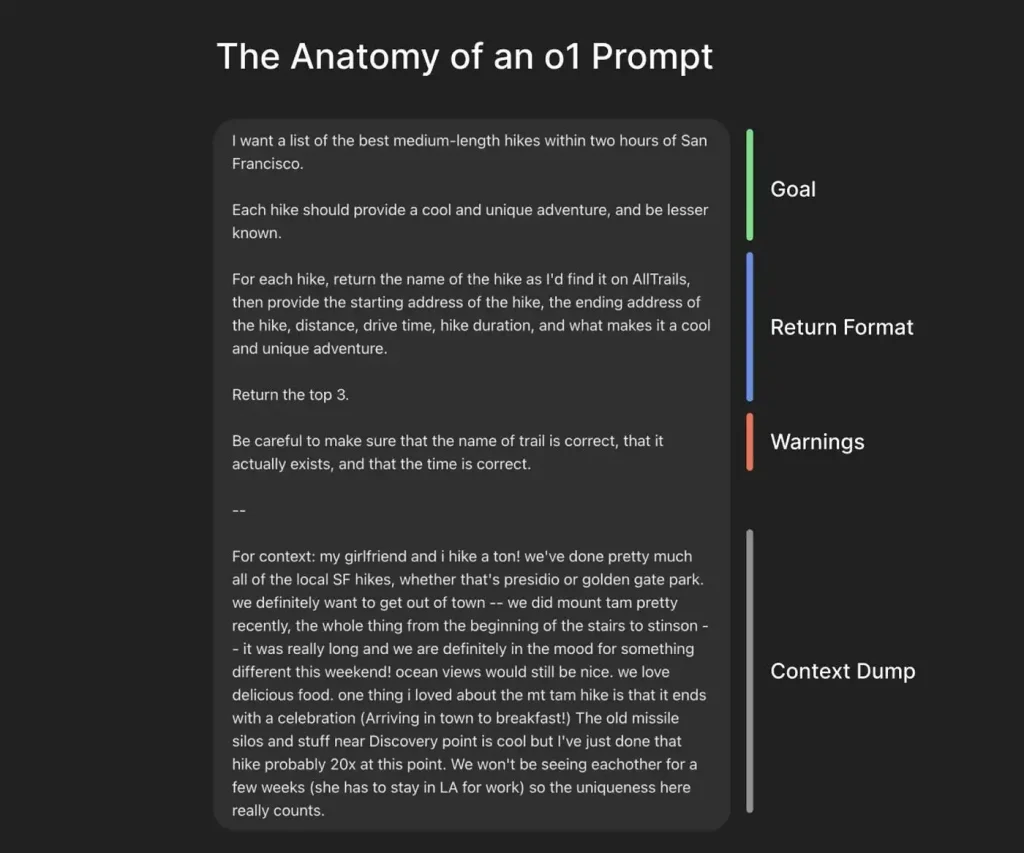
    OpenAI co-founder Greg Brockman recently shared an excellent breakdown of what he calls an “o1 prompt” – a highly effective prompt structure that consistently delivers quality outputs, especially when using ChatGPT’s o1 model.

    As shown in his example, the best prompts typically contain 4 key components:

    1. A clear goal statement
    2. Specific return format instructions
    3. Important warnings or constraints
    4. Relevant context

    Notice how the hiking prompt begins with the precise request, then adds specific requirements about the type of hikes wanted, followed by exactly how the information should be structured, potential pitfalls to avoid, and finally personal context that helps tailor the response.

    This structured approach eliminates ambiguity and gives ChatGPT all the information it needs to deliver a highly personalized, useful response.

    V. Avoiding Common Pitfalls

    Being too vague or open-ended

    One of the biggest mistakes people make is asking questions that are so broad or vague that ChatGPT has to guess what you want. Questions like “Tell me about marketing” or “How do I get better at my job?” give the AI too much room to interpret.

    When your prompt is vague:

    • The response will likely be generic and surface-level
    • You’ll probably need to ask multiple follow-up questions
    • You might get information that’s not relevant to your actual needs

    Instead, take a moment to think about what specific aspect of the topic you’re interested in, and what you plan to do with the information. Then craft your prompt accordingly.

    Overloading the prompt with information

    While context is important, there’s such a thing as too much information. Extremely long prompts with excessive details can confuse the model or cause it to focus on the wrong aspects of your request.

    Signs you might be overloading your prompts:

    • ChatGPT seems to ignore important parts of your request
    • Responses address only the first or last portion of your prompt
    • The AI seems confused or asks for clarification

    Aim for a balance – include relevant details but be concise. If you have a lot of information to share, consider breaking it up into a more conversational exchange rather than one massive prompt.

    Misinterpreting output as factual information

    This is not so much a prompt issue as a usage issue, but it’s critical: ChatGPT is not a search engine or database. It generates responses based on patterns in its training data, which means it can produce plausible-sounding but incorrect information.

    When using ChatGPT:

    • Be skeptical of specific facts, figures, dates, and quotes
    • Verify important information with reliable sources
    • Use the AI for idea generation and drafting rather than as the final authority
    • Be especially careful with technical, medical, legal, or financial information

    You can mitigate this somewhat by asking ChatGPT to cite sources or indicate when it’s unsure, but remember that even these citations need verification.

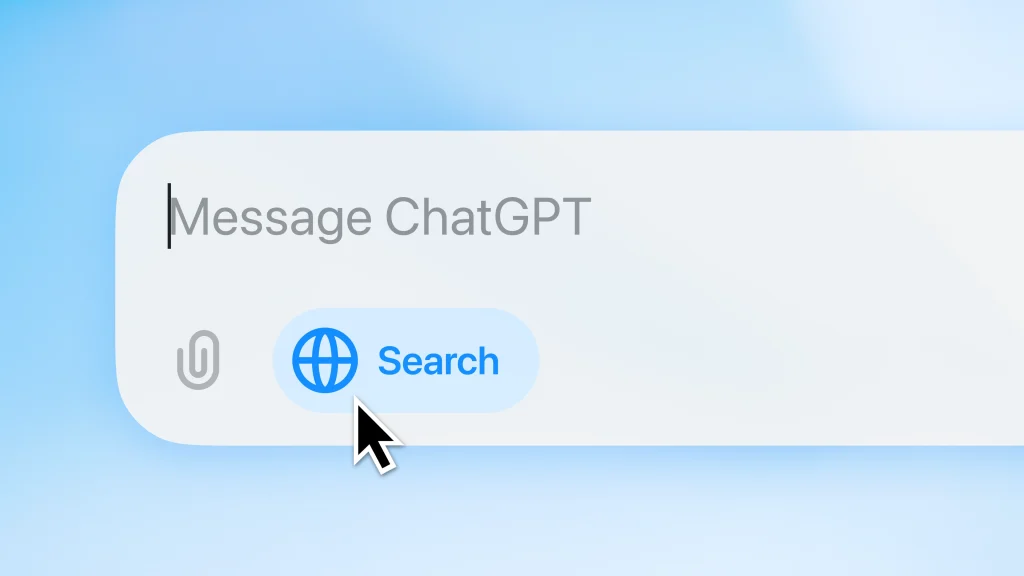
    UPDATE: Since October 2024, ChatGPT has introduced ChatGPT Search, which delivers updated, live information – addressing one of the biggest limitations of the original version.

    This feature allows ChatGPT to access current information from the web, making it more useful for questions about recent events, new products, or evolving topics.

    This is a game-changer because previously, ChatGPT was limited to information it learned during training. Now it can provide more timely and accurate responses to questions about current events and developments.

    VI. Real-life ChatGPT Examples and Case Studies

    Analyzing successful prompts

    Let’s look at some examples of prompts that work particularly well, and understand why.

    Example 1: Writing Assistant

    ❌ Poor prompt: “Help me write better.”

    ✅ Effective prompt: “I’m writing a cold email to potential clients for my graphic design services. My target audience is small business owners in the food industry. Write an email template that highlights the importance of strong branding, keeps the tone friendly but professional, and includes a clear call to action. The email should be around 200 words.”

    Why it works: This prompt provides specific context (cold email, graphic design services), identifies the audience (small business owners in food industry), gives clear parameters (tone, length, elements to include), and has a defined purpose.

    Example 2: Research Help

    ❌ Poor prompt: “Tell me about climate change.”

    ✅ Effective prompt: “I’m preparing a 10-minute presentation for high school students about climate change. Can you help me create an outline that covers the basic science, three major impacts, and two actionable steps students can take? Please keep the language simple but not condescending, and include one surprising fact or statistic for each section to maintain interest.”

    Why it works: This specifies the audience (high school students), format (10-minute presentation), exact structure needed (science, impacts, actions), tone requirements (simple but not condescending), and even includes a specific request for engaging elements (surprising facts).

    Lessons learned from ineffective prompts

    We can learn just as much from analyzing prompts that didn’t work well:

    Example 1: The E-commerce Strategist

    ❌ Ineffective prompt: “Help me increase my online sales.”

    Problem: No information about the business type, current situation, target market, or specific challenges. It’s impossible to provide tailored, actionable advice.

    ✅ Improved version: “I run a small online boutique selling handmade leather accessories with average monthly sales of $3,000. Our conversion rate has dropped from 3.2% to 1.7% over the last quarter despite steady traffic. Our target audience is professionals aged 30-45 who value quality and craftsmanship. Can you suggest 5 specific strategies to improve our product page conversion rate, focusing on elements we could implement before the holiday shopping season begins?”

    Example 2: The Content Creator

    ❌ Ineffective prompt: “Write me an article about leadership.”

    Problem: No indication of length, style, audience, purpose, or specific aspects of leadership to focus on.

    ✅ Improved version: “Write me a 700-word article about servant leadership for my company blog. The audience is middle managers in the tech industry. Focus on practical ways to implement servant leadership principles in day-to-day team management. Use a conversational tone with 2-3 real-world examples, and include a brief introduction explaining what servant leadership is.”

    The key lessons from these examples:

    1. Include all relevant information in your initial prompt
    2. Specify format, length, and style requirements
    3. Identify your audience and purpose
    4. Break complex requests into clear components
    5. When appropriate, provide examples of what you’re looking for

    VII. Conclusion

    Recap of key points and takeaways

    We’ve covered a lot of ground in this guide to mastering ChatGPT prompts.

    Here are the essential takeaways:

    • Prompts are instructions that guide ChatGPT toward the type of response you want
    • Specificity is your friend – vague prompts lead to vague responses
    • Context matters – ChatGPT doesn’t know anything about you or your situation unless you tell it
    • Constraints and guidelines help channel the AI’s responses in useful directions
    • Advanced techniques like system messages, role-playing, and step-by-step instructions can dramatically improve results
    • Iteration is often the best approach for complex tasks
    • Always verify factual information from ChatGPT with reliable sources

    The difference between a basic user and a power user often comes down to prompt crafting skills. With practice, you’ll develop an intuition for how to phrase your requests to get the most helpful, relevant responses.

    Encouragement to experiment and learn through practice

    The best way to get better at crafting prompts is simple: practice.

    ChatGPT is remarkably forgiving – there’s no penalty for trying, adjusting, and trying again. Each interaction is an opportunity to refine your approach.

    Start by taking a prompt you’ve used before and asking yourself:

    • How could I make this more specific?
    • What context might help ChatGPT better understand what I need?
    • Are there constraints or guidelines that would improve the response?

    Then experiment with different variations and see what works best. Pay attention to which prompts generate the most useful responses, and look for patterns you can apply to future interactions.

    Remember, effective prompt crafting is not just about getting better responses from ChatGPT – it’s about learning to communicate your needs clearly and specifically, a skill that has value far beyond AI interactions.

    So go ahead, start experimenting, and watch as your AI conversations transform from basic Q&A to truly valuable exchanges that save you time and generate insights you might not have discovered on your own. Your prompt is powerful, use it wisely!